- Create a User Account on the Redex System
- Public API Summary
- Device Application
- Document
- Inventory
- Generation Data
- REC Application
- Retirement Application
Create a User Account on the Redex System
- Go to REDEX REHash platform
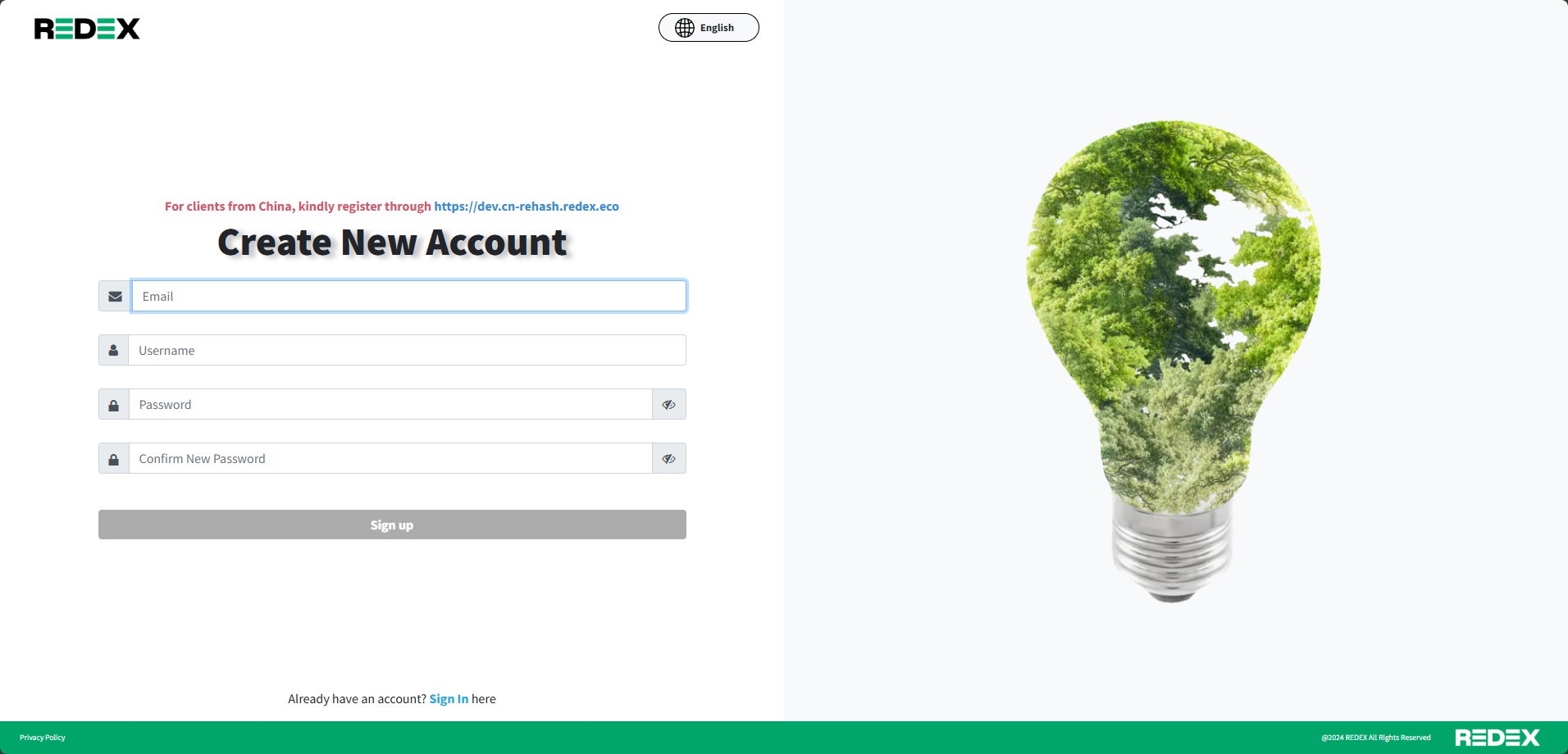
- Click “Sign up”
- Input all the info => The button “Sign up” will light up => Click “Sign up”
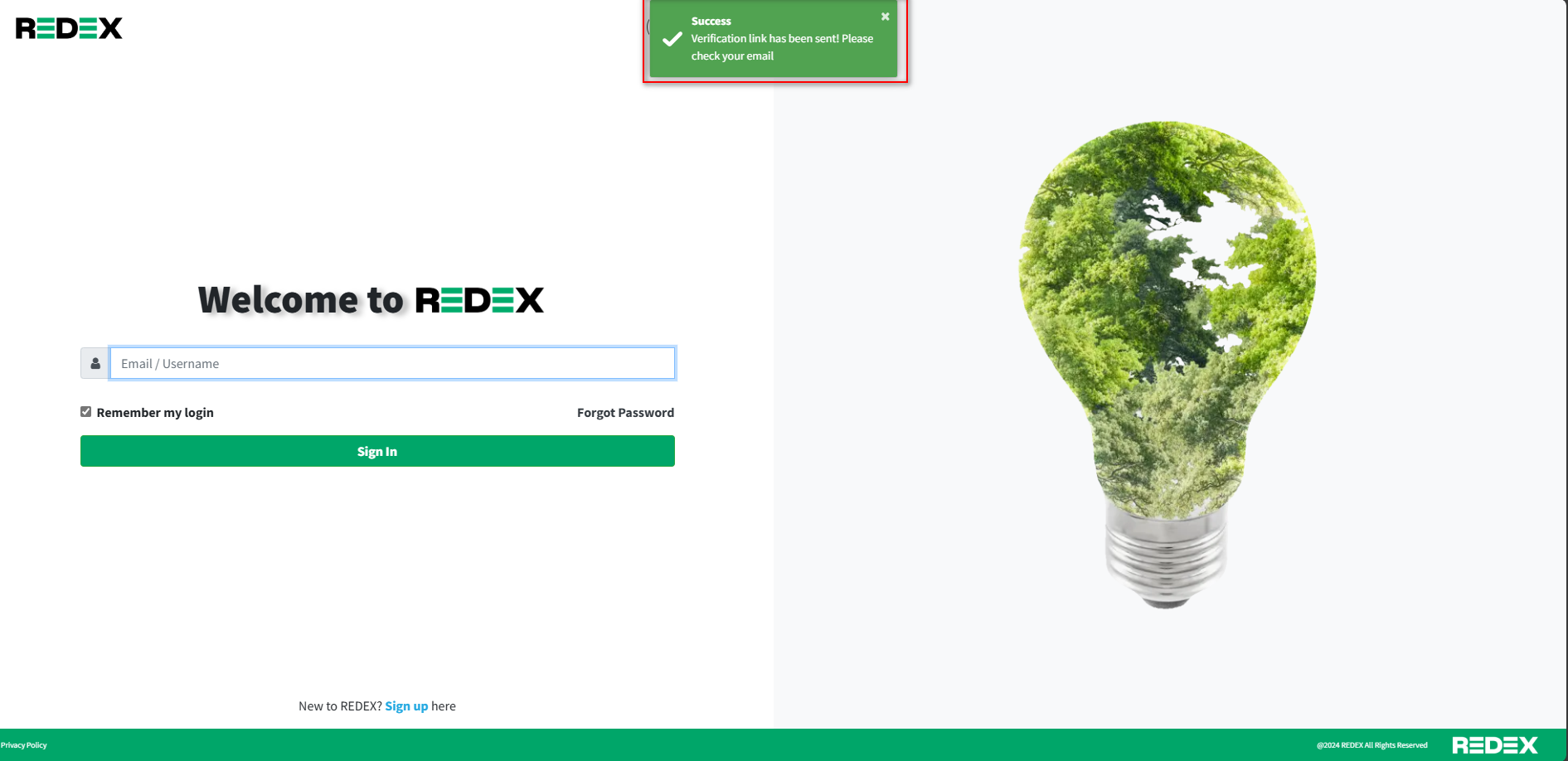
- The page will re-direct to login page including the popup showing “Success” . Go to your email inputted in step 2 and check the mail received. (If you don’t see it, please check the Spam folder)
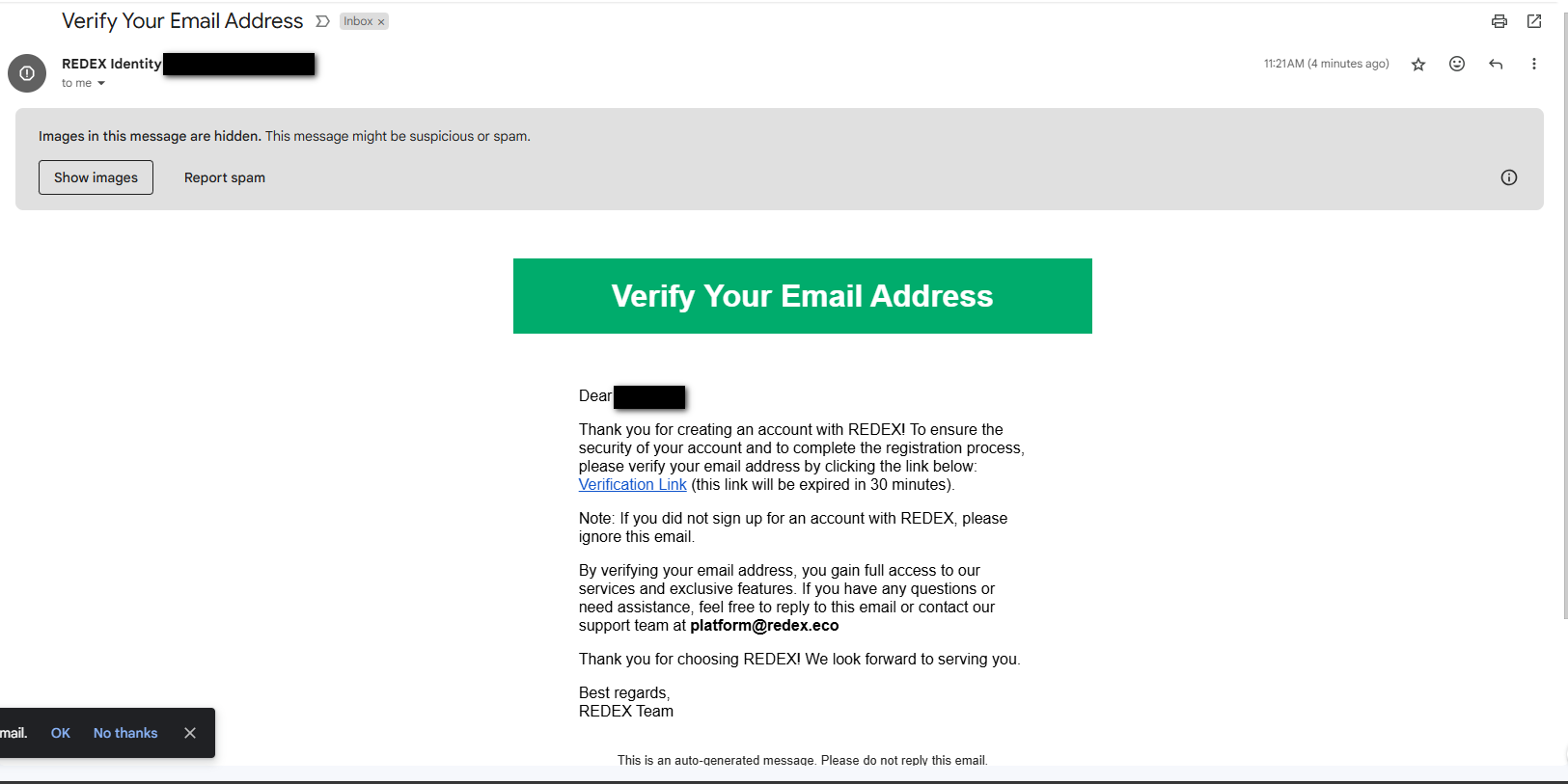
- Click “Verification Link” , it will re-direct to Login page (Your account has been verified ).
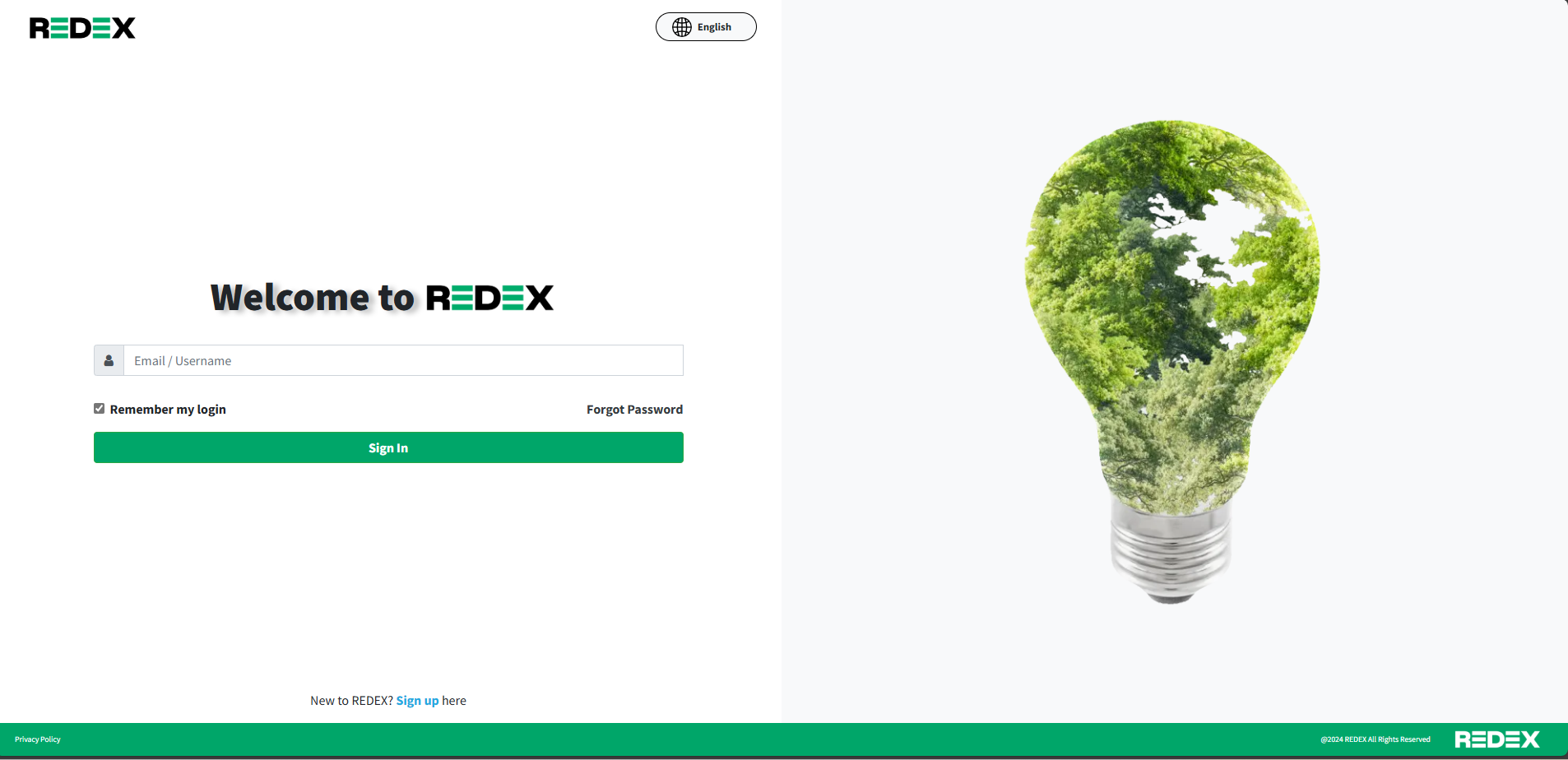
- Input your account info, it will go to the page to input your company info and payment info
Section “Company Information” For which field have * , you have input the value
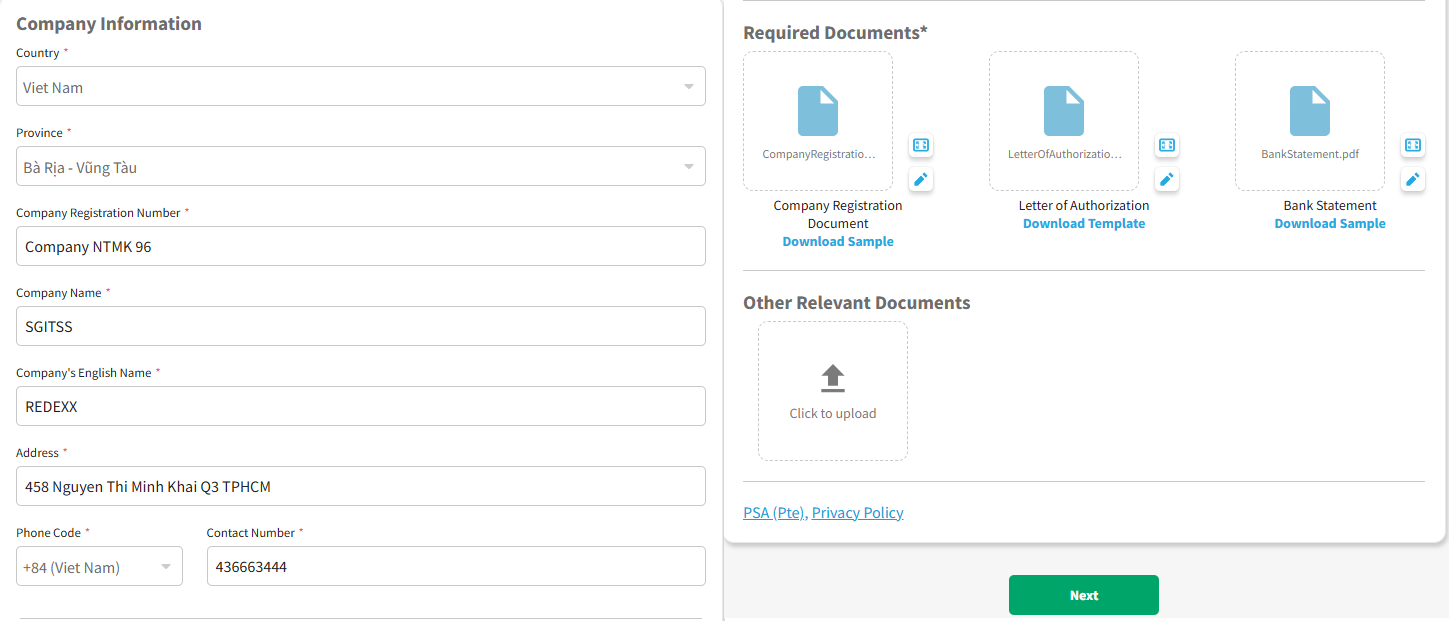
- Click “Next” , it will go to section “Payment Information” . For which field have * , you have input the value
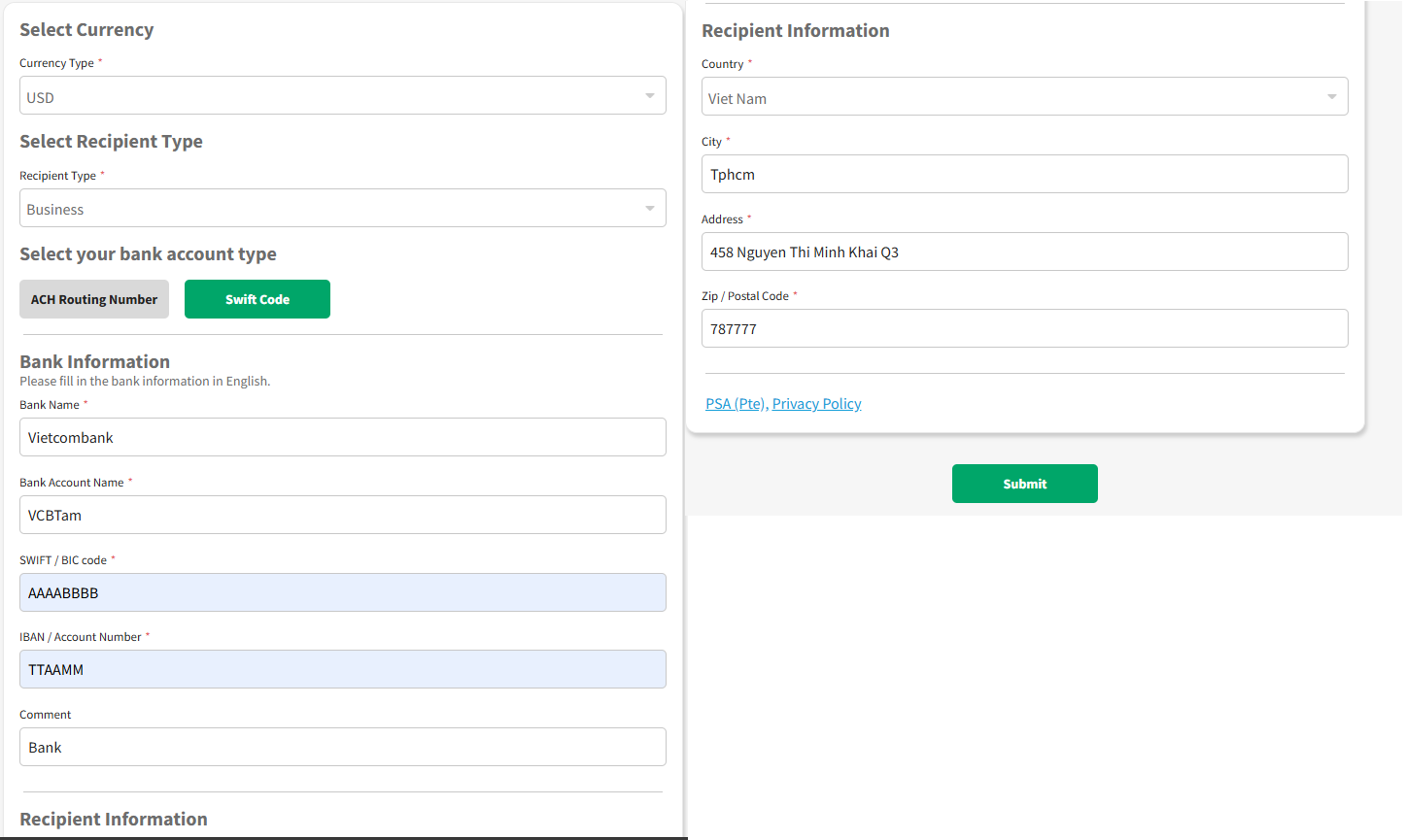
- Click button “Submit” . The popup Agreement will appear. Scroll to the end and tick the checkbox “I have read and agreed to the Platform Service Agreement (PSA) and Privacy Policy“
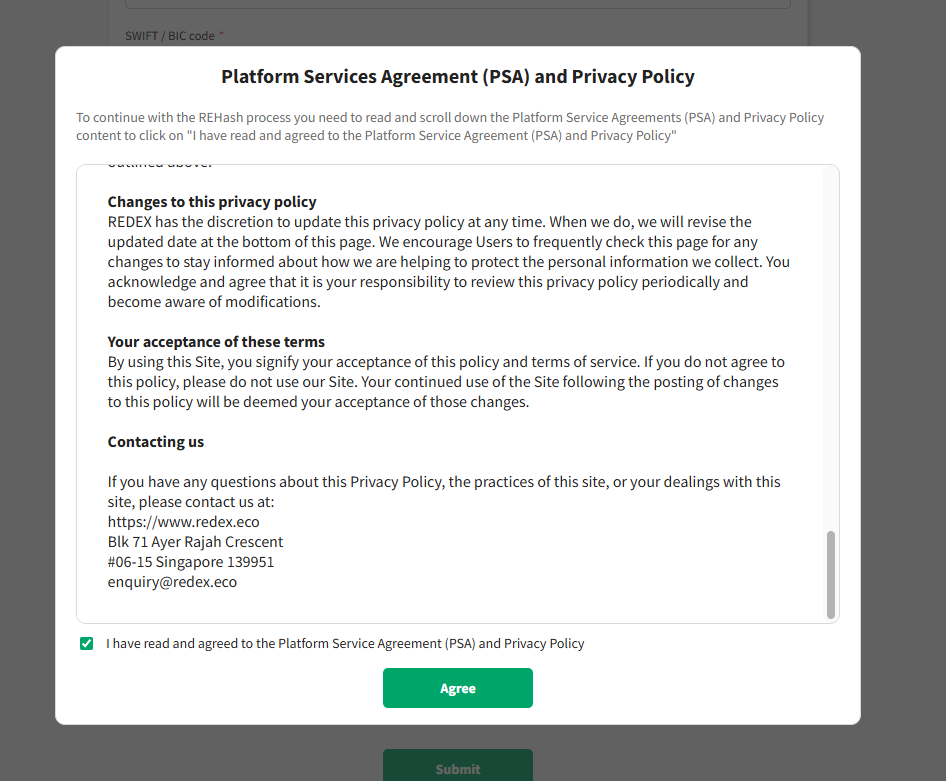
- Click “Agree” . Your info has been submitted, and you can see an overview of your account.
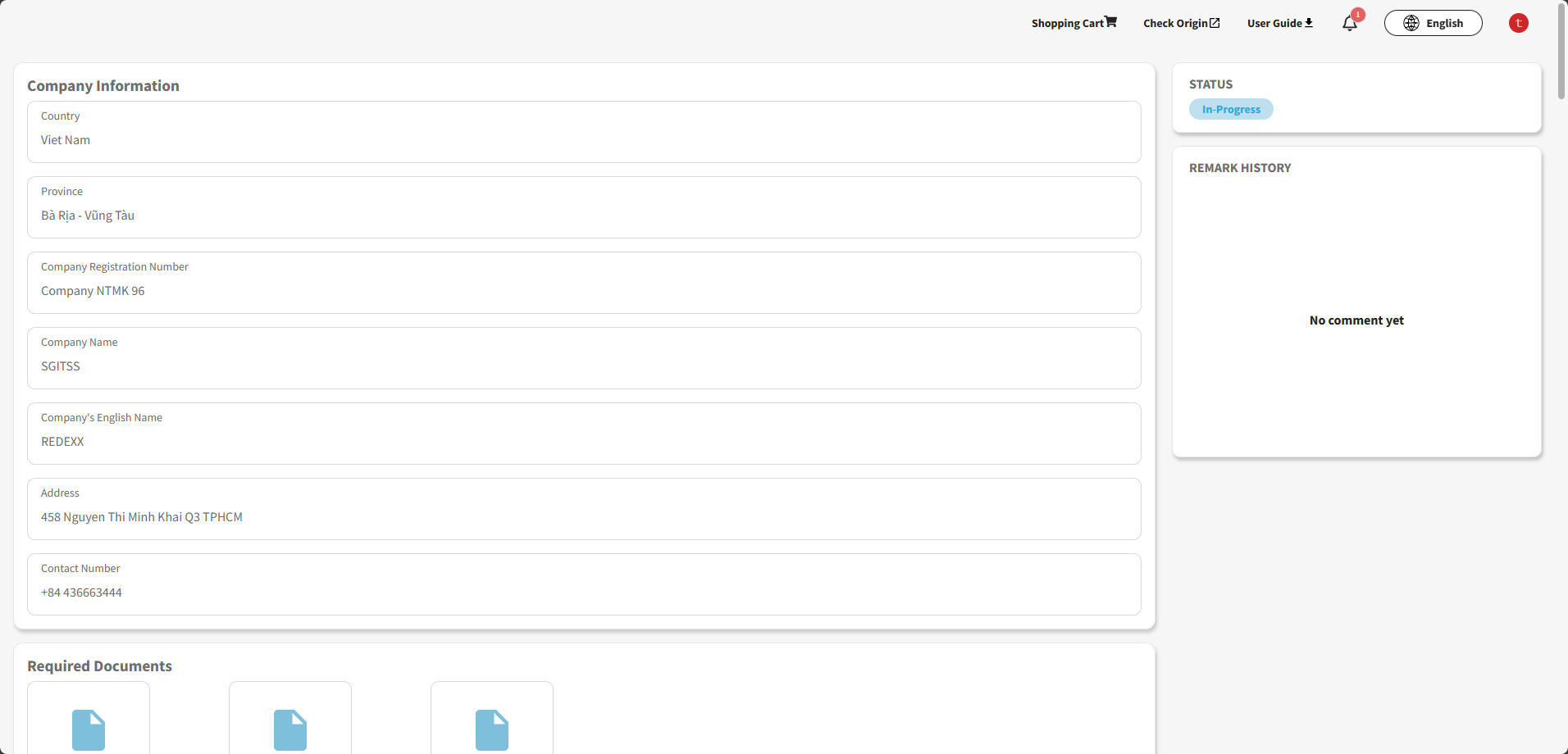
- On this step, you need to wait for Ops Admin on the REHash system to approve your application. If your information has something wrong, they will Return or Reject your application with a reason.
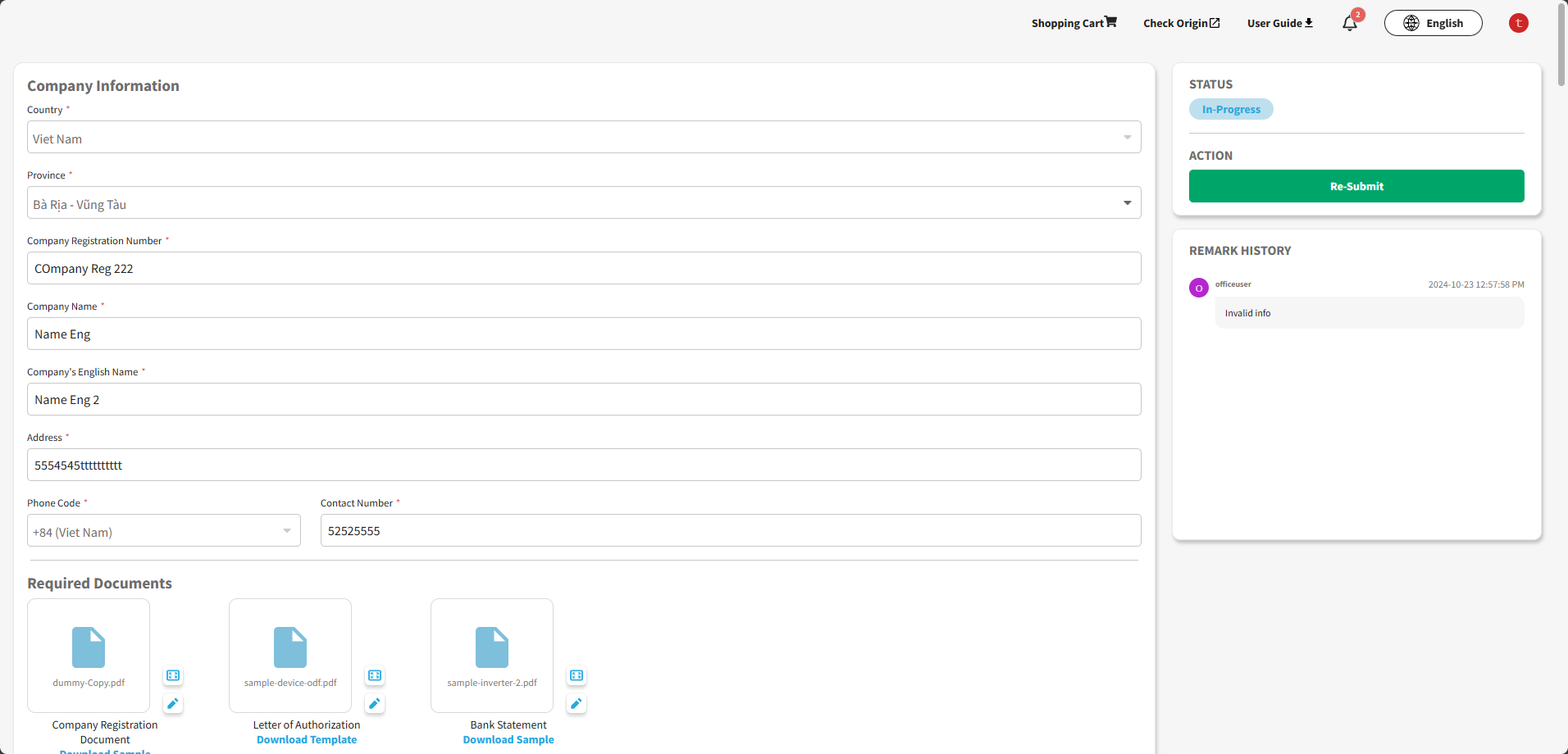
Example: the application is invalid and the user has to edit the info
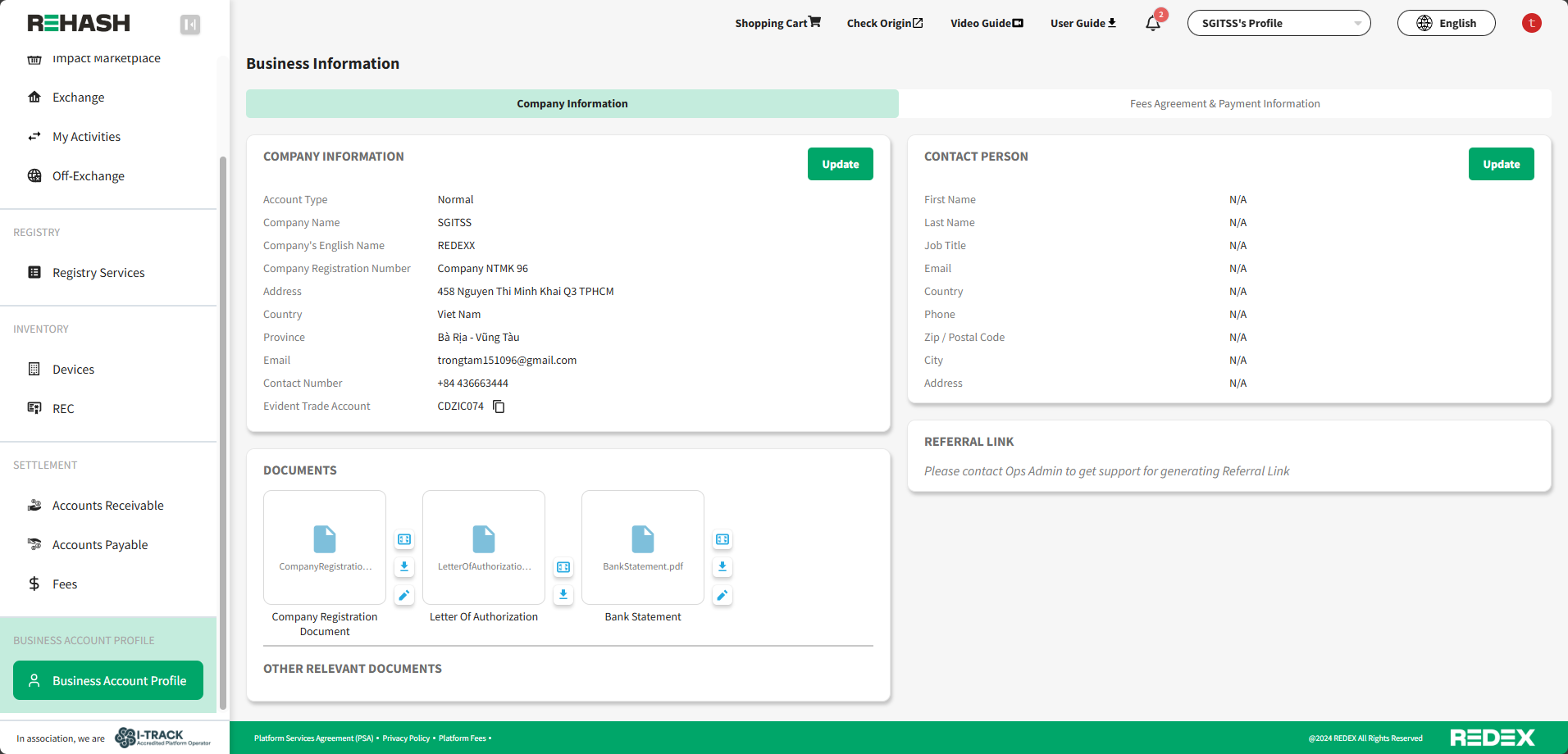
Example: The application was approved by Ops Admin (When you log in again, you will go into the REHash portal)
Public API Summary
How to use the PublicAPI
Set “Authorization”: “Bearer {access_token}”
Example:

1. Device Application
Create Device Application
- Route:
public/v2/device-applications/i-rec/grouped - Create the grouped device with devices and inverters information
Get Device Applications
- Route:
public/v2/device-applications - Get devices information
Get Device Applications Detail
- Route:
public/v2/device-applications/{deviceApplicationId} - Get device detail information
Get Device Information
- Route:
public/v2/device-applications/{deviceApplicationId}/devices - Get device and inverter information
Get Inverter Application Information
- Route:
public/v2/device-applications/inverters/applications - Get inverter application information
2. Documents
Create Document File
- Route:
public/v2/documents/grouped-devices - Create Document File Id
3. Inventory
Get Devices Inventory Information
- Route:
public/v2/inventories/devices - Get devices approved information
Get Recs Inventory Information
- Route:
public/v2/inventories/recs - Get recs inventory information
Get Recs Inventory Information by Advance Filter
- Route:
public/v2/inventories/recs/filter - Get recs inventory information by advance filter
4. Generation Data
Get Generation Data Information
- Route:
public/v2/generation-datas - Get generation data information
Send Generation Data Information
- Route: [POST]
public/v2/generation-datas - Push generation data for device
Send Batches Generation Data Information
- Route:
public/v2/generation-datas/batches - Push many generation data for device
Send Monthly Generation Data Information
- Route:
public/v2/generation-datas/monthly-data - Push monthly generation data for device
5. REC Application
Get Rec Issuance Application
- Route:
public/v2/rec-applications - Get recs issuance application
Get Rec Issuance Application Detail
- Route:
public/v2/rec-applications/{recApplicationId} - Get rec issuance application detail
Get Rec Transaction History
- Route:
public/v2/rec-transaction-history - Get rec transaction history
Create Rec Issuance Application
- Route:
public/v2/rec-applications/grouped-device - Create rec issuance application
6. Retirement Application
Get Retirement Application
- Route:
public/v2/retirement-applications - Get retirement application
Get Retirement Application Detail
- Route:
public/v2/retirement-applications/{retirementApplicationId} - Get retirement application detail
Get Beneficiaries Information
- Route:
public/v2/retirement-applications/beneficiaries - Get beneficiaries information
Get Beneficiaries Type
- Route:
public/v2/retirement-applications/beneficiaries/types - Get beneficiary type
Create Retirement Application
- Route: [POST]
public/v2/retirement-applications - Create retirement application
Create Beneficiaries Application
- Route: [POST]
public/v2/retirement-applications/beneficiaries - Create beneficiary information
Rate Limit Algorithm: Fixed Window
In fixed window rate limiting, a fixed time window (e.g., one minute, one hour) is used to track the number of requests or actions allowed within that window. Requests exceeding the limit are either rejected or throttled until the window resets.
Rate Limiting Overview
Our API employs rate limiting to ensure fair usage and protect the performance and availability of the service. Combination of Global Policy and Operation Policy
Global Policy
- Rate Limit: 3000 requests per 5 minute(s)
- Renewal Period: 300 second(s)
- Key: IP Address
- Increment Condition: Any Request
Operation Policy
- Rate Limit: 60 requests per 1 minute(s)
- Renewal Period: 60 second(s)
-
Key:
account-idbusiness account Id - Increment Condition: Any Request
Rate Limit Details
-
Rate Limit by Key:
a. Key: This ensures that rate limits are applied uniquely for each business account id.
b. Request Limit: Each key is allowed to make up to 60 requests per minute.
c. Reset Interval: The limit resets every 60 seconds.
-
Response Headers:
a. Retry-After: Sent when the rate limit is exceeded, indicating how long to wait before making another request.
Exceeding the Rate Limit
When the rate limit is exceeded, the API will return a 429 Too Many Requests status code. The response will include a Retry-After header specifying the number of seconds to wait before making a new request.
Example Response When Rate Limit is Exceeded
HTTP/1.1 429 Too Many Requests
Retry-After: 60
Content-Type: application/json
{
    "Data": null,
    "Errors": null,
    "StatusCode": 429,
    "Message": "Rate limit exceeded",
    "Meta": null
}
Step 1: Upload ODF file for Devices.
Templates can be found here. ODF Form's templates
Upload the document using this API: [POST] Upload Document for Grouped Devices
Notes: ODF file must be send as pdf file
Step 2: Register and Group Device together
Using this API to register renewable devices and their inverters. Then adding those devices into 1 single grouped device.
Read more about Grouped Device terminology here: Grouped Device Terminology
Link to API document: [POST] Register Grouped Device Application
Notes:
- 1 Grouped device must have max inverters as 500 inverters.
- All of devices in 1 grouped device must be in same Province.
- All of devices in 1 grouped device can have grid connection date or commission date in different years.
- Each inverter must have max capacity as 0.25MW.
- Each inverter has RemoteInvId this is unique id from the owner system. Using this id to push generation data.
Step 3: Pushing generation data to inverter by RemoteInvId
Using APIs to sending generation by RemoteInvId. There are 2 ways to sending generation data:
1. By single inverter: [POST] Send Generation Data for Grouped Device
2. By batch (multiple inverters): [POST] Send Batch Generation Data for Grouped Device
Notes: Each API has maximum records of generation data is 3,000 daily records.
Grouped Device Terminology
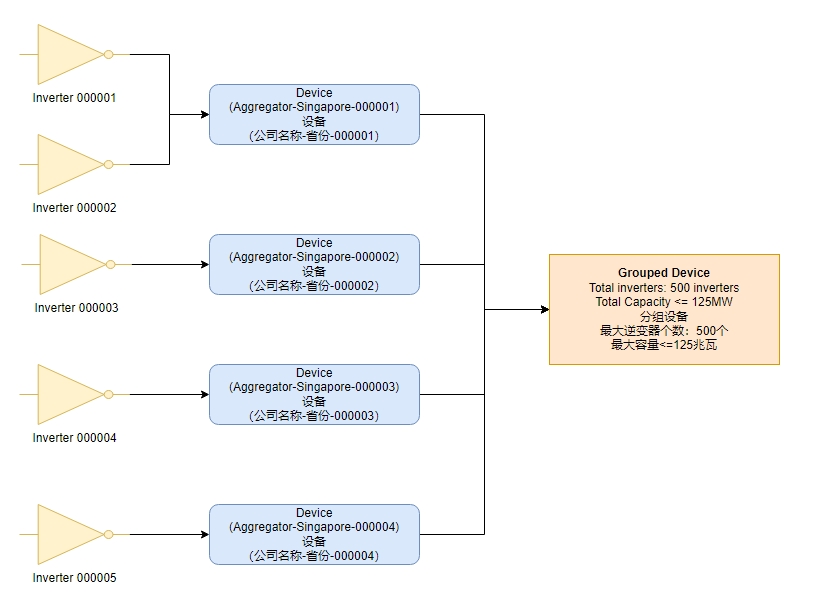
A grouped device container that holds multiple devices, each of which can contain one or multiple inverters.
- Registry supports I-REC
- Fuel type: Group Solar Rooftop
- Locations: SG, CN, VN, MY, ID, BR, MX
- Generation data: required on inverter level.
- Can contains multiple devices and their inverters.
-
Max number of all device’s inverters in the grouped device should not be greater than 500 inverters (this number is the current limit and can be changed or increased in the future).
- Each device’s inverters’ total capacity must not greater than 0.25MW.
Residual Mix Deadline
There are two deadlines issuance every year: 31 May and 30 September. This means the earliest issuance date can be requested before 31 May this year is 1 January in the previous year. Similarly, the earliest effective registration date can be requested after 31 May this year but before 30 September this year is 1 July in the previous year.
For example, for submitting an issue request on 27 February 2024 (which is before 31 May 2024), the earliest possible claim issuance period date that can be requested is any date from 1 January 2023 onwards.
Please note that you cannot request issuance for power generated before the effective registration date.
More examples:
| Issuance Request Submitted Month / Device Registration Submitted Month | Earliest Possible Claim Issuance From |
| Jan-24 | 1st January 2023 |
| Feb-24 | |
| Mar-24 | |
| Apr-24 | |
| May-24 | |
| Jun-24 | 1st July 2023 |
| Jul-24 | |
| Aug-24 | |
| Sep-24 | |
| Oct-24 | 1st January 2024 |
| Nov-24 | |
| Dec-24 |
Owner Declaration Form (ODF)
|
ODF Type |
Description |
File Template |
Version |
|---|---|---|---|
|
3 Parties ODF with Appendix A-B Note: ODF must be in searchable PDF format (Able to search PDF content using Ctrl+F) |
3 Parties ODF with Appendix A-B (EN & CN) |
|
Sep 4, 2024 Version: v1.4 |
|
3 Parties ODF with Appendix A-B (EN & POR) |
|
Nov 11, 2024 Version: v1.1 |
|
|
3 Parties ODF with Appendix A-B (EN & ESP) |
|
Nov 11, 2024 Version: v1.1 |
|
|
3 Parties ODF with Appendix A-B (EN) |
|
Sep 4, 2024 Version: v1.4 |
|
|
2 Parties ODF with Appendix A Note: ODF must be in searchable PDF format (Able to search PDF content using Ctrl+F) |
2 Parties ODF with Appendix A (EN & CN) |
|
Sep 4, 2024 Version: v1.3 |
|
2 Parties ODF with Appendix A-B (EN & POR) |
|
Nov 11, 2024 Version: v1.1 |
|
|
1 Parties ODF with Appendix A-B (EN & ESP) |
|
Nov 11, 2024 Version: v1.1 |
|
|
2 Parties ODF with Appendix A (EN) |
|
Sep 4, 2024 Version: v1.3 |
Reference Province Codes
|
1 |
Code |
Country Code |
Pin Yin |
Province |
Category |
New Inverter request
Added new optional fields (
EffectiveStartDate, EffectiveEndDate, ReplacedByRemoteInvId
) for use when replacing faulty inverters.
|
Request |
|---|
|
EffectiveStartDate (optional) text - format Inverter’s effective start date. Rule:
Datetime in format: ex: 2023-01-10 |
|
EffectiveEndDate (optional) text - format Inverter’s Effective End Date: The date set to indicate when the inverter has become inactive. Rule:
Datetime in format: ex: 2024-01-10 |
|
ReplacedByRemoteInvId (optional) - text - max length (100) Replaced By Remote Inverter Id Rule:
ex: INV1000000033862740 |
Business Scenarios
Scenario 1
If an inverter is damaged during use and has already generated power data but has not yet been registered in the REDEX system, it is allowed to replace the damaged inverter with a new one during the device registration process. After successful registration, the damaged inverter can still issue the generation data it has generated.
Flow
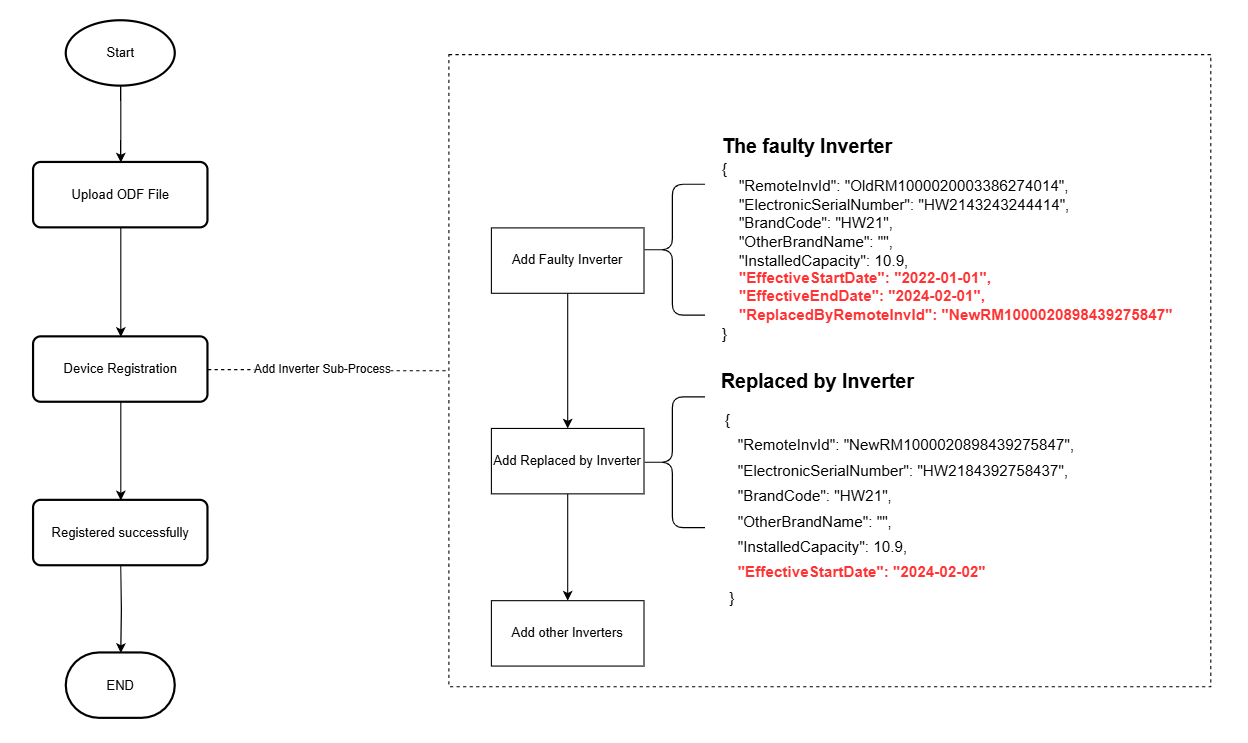
Example request
"Inverters": [
  // the faulty inverter
  {
    "RemoteInvId": "OldRM1000020003386274014",
    "ElectronicSerialNumber": "HW2343243244414",
    "BrandCode": "HW21",
    "OtherBrandName": "",
    "InstalledCapacity": 10.9,
    "EffectiveStartDate": "2022-01-01",
    "EffectiveEndDate": "2024-02-01",
    "ReplacedByRemoteInvId": "NewRM1000020898439275847"
  },
  // the replaced by inverter
  {
    "RemoteInvId": "NewRM1000020898439275847",
    "ElectronicSerialNumber": "HW8984392758437",
    "BrandCode": "HW21",
    "OtherBrandName": "",
    "InstalledCapacity": 9.9,
    "EffectiveStartDate": "2024-02-02"
  }
]
Scenario 2
If a registered inverter in the Redex system fails during use, you can replace and register a new inverter in the Rehash system. Please contact our operations team for assistance.
REDEX Public API supports multiple ways to register device to Registry. They are: REDEX 公众接口支持多种方式向注册中心注册设备。如下:
A device without connection created to pushing any generation data:
- Registry supports: both I-REC and TIGR.
- Fuel type: all fuel types.
- Locations: all locations.
- Capacity: all capacities.
- Generation data: not required.
A device with connection created to pushing generation data.
- Big device:
- Registry supports: I-REC.
- Fuel type: all fuel types.
- Locations: all locations.
- Capacity: all capacities.
- Generation data: required on device level.
- Grouped Device:
- Registry supports: I-REC.
- Fuel type: Group Solar Rooftop.
- Locations: all locations.
- Capacity: not greater than 500MW.
- Generation data: required on device level.
- Big device:
Data Flow:
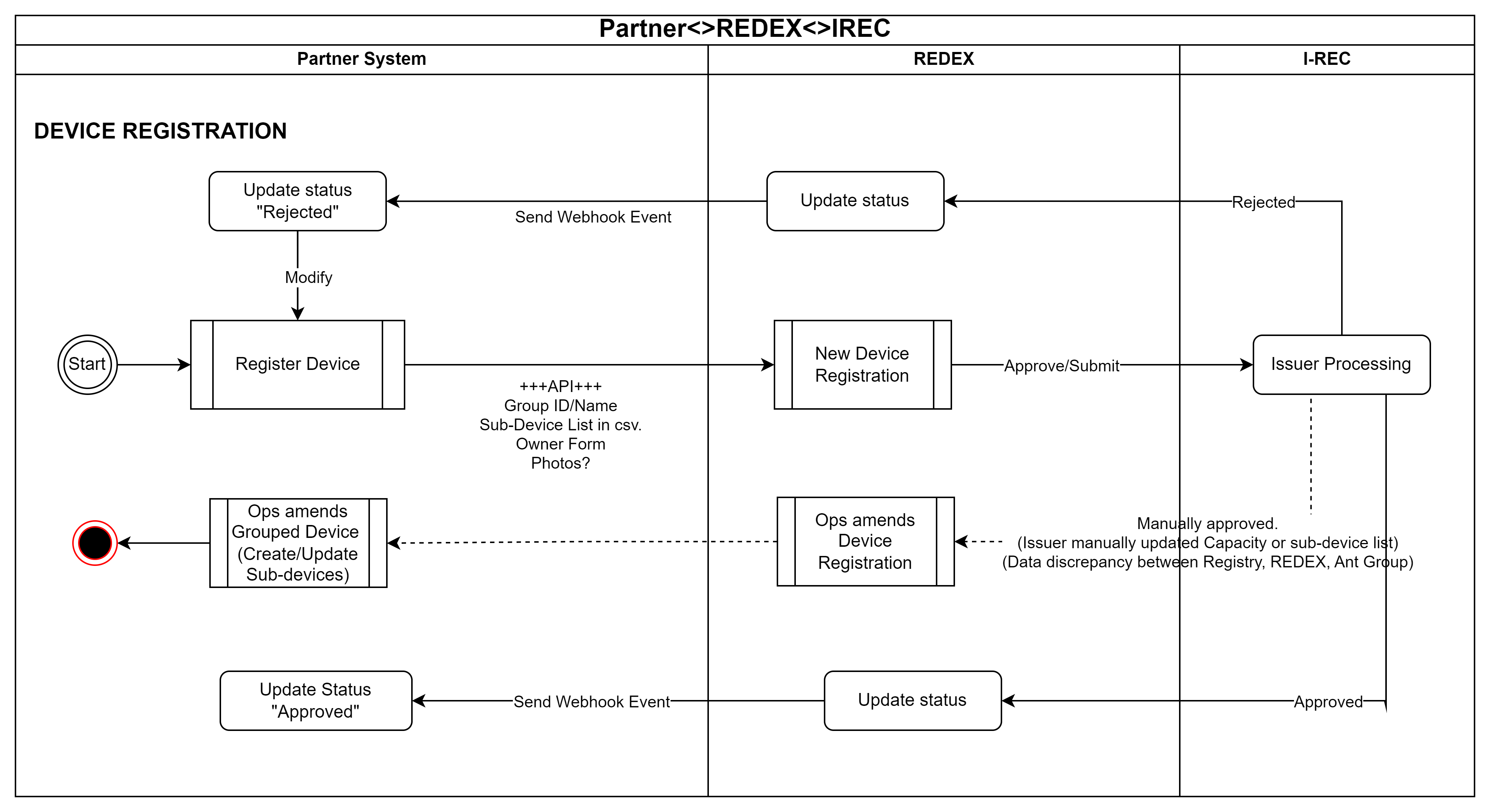
Upload document for digital devices:
[GET] Get Grouped Device Application's devices and inverters
This endpoint allows get devices & inverters application.
Authorizations:
path Parameters
| deviceApplicationId required | string <uuid> |
query Parameters
| OrderBy | string Represents the field used to specify the ordering of the results. |
| IsDescending | string Represents the sorting order for the query results. |
| Search | string Sets the search query used for filtering the results. |
| CurrentPage | string Represents the current page number for paginated results. |
| ItemsPerPage | string Represents the number of items per page for paginated results. |
Responses
Response samples
- 200
{- "Data": [
- {
- "Id": "38a5a5bb-dc30-49a2-b175-1de0d1488c43",
- "InstallationName": "Kong Meng San Phor Kark See Monastery",
- "Address": "88 Bright Hill Road",
- "PostalCode": "431231",
- "Longitude": 1.361516,
- "Latitude": 1.361516,
- "GridConnectionDate": "2022-05-15",
- "OwnersDeclarationStartDate": "2022-05-15",
- "OwnersDeclarationEndDate": "2022-10-15",
- "Domestic": false,
- "FeedInTariff": false,
- "DeclarationForm": "a70fa68f-58a9-46d1-a338-f2e023af3194",
- "PercentageRenewable": 45.55,
- "Timezone": "UTC+08:00",
- "CreatedTime": "2021-08-24T14:15:22Z",
- "Inverters": [
- {
- "Id": 12,
- "RemoteInvId": "RM1000020898439275847-T",
- "BrandCode": "HW21",
- "OtherBrandName": "",
- "ElectronicSerialNumber": "HW8984392758437-T",
- "InstalledCapacity": 9.9,
- "CreatedTime": "2021-08-24T14:15:22Z",
- "EffectiveStartDate": "2022-01-01",
- "EffectiveEndDate": "2023-12-31",
- "IsActive": true,
- "ReplacedByInverterId": null,
- "OperationalStatus": "Active"
}
]
}
], - "Meta": null,
- "Errors": [
- {
- "Key": "string",
- "Message": "string",
- "Messages": [
- "string"
]
}
], - "StatusCode": 0,
- "Message": "string"
}[POST] Register Grouped Device Application
This endpoint allows register grouped device application.
Authorizations:
Request Body schema:
| CountryCode required | string [ 0 .. 2 ] characters 2-character country alpha code. ISO-3166. Supported list below: Country Code i.e. SG, CN, VN, MY, ID |
| GroupedEnglishName required | string [ 1 .. 255 ] characters A Grouped Device's Name in English. |
| GroupedLocalName required | string [ 1 .. 255 ] characters A Grouped Device's Name in Local Language |
| Province required | string [ 1 .. 20 ] characters A Grouped Device's Province. |
| Timezone | string or null <= 50 characters Time zone information. |
| GenerationDataFrequency | string or null Grouped Device Generation Data Frequency on Grouped Device to indicate that this Grouped Device will send generation data by Daily or Monthly, default is Daily |
Array of objects or null (PublicDeviceApplicationRequest) A Grouped Device's devices |
Responses
Request samples
- Payload
{- "CountryCode": "CN",
- "GroupedEnglishName": "Sun LM101",
- "GroupedLocalName": "Sun LM101",
- "Province": "CN-HN",
- "Timezone": "UTC+08:00",
- "GenerationDataFrequency": "Daily",
- "Devices": [
- {
- "InstallationName": "SingaporeSolarDeveloper-Singapore-000001",
- "Address": "Singapore Marine Parade Jago Cl62 Jago Cl",
- "PostalCode": "321654",
- "Longitude": 103.90861,
- "Latitude": 1.305278,
- "GridConnectionDate": "2022-05-13",
- "OwnersDeclarationStartDate": "2022-05-13",
- "OwnersDeclarationEndDate": "2022-05-15",
- "Domestic": false,
- "FeedInTariff": false,
- "DeclarationFormFileId": "007a64ae-80fc-4e7f-bc9e-3fc54b9f5e9e",
- "PercentageRenewable": 50.25,
- "Inverters": [
- {
- "RemoteInvId": "INV1000000033862740",
- "ElectronicSerialNumber": "TA23432432444",
- "BrandCode": "HW21",
- "OtherBrandName": "",
- "InstalledCapacity": 112.123,
- "EffectiveStartDate": "2023-01-01",
- "EffectiveEndDate": "2023-12-31",
- "ReplacedByRemoteInvId": null
}
]
}
]
}Response samples
- 200
{- "Data": {
- "Id": "38a5a5bb-dc30-49a2-b175-1de0d1488c43"
}, - "Meta": null,
- "Errors": [
- {
- "Key": "string",
- "Message": "string",
- "Messages": [
- "string"
]
}
], - "StatusCode": 0,
- "Message": "string"
}[GET] Get Grouped Device Application's inverters
This endpoint allows get inverters application.
Authorizations:
query Parameters
| RemoteInverterIds required | Array of strings Required |
Responses
Response samples
- 200
{- "Data": [
- {
- "DeviceApplicationId": "56861cc4-0ab8-4a5f-c574-08dc5a883338",
- "RemoteInverterIds": "RM1000020898001, RM1000020898002",
- "Status": "Pending"
}
], - "Meta": null,
- "Errors": [
- {
- "Key": "string",
- "Message": "string",
- "Messages": [
- "string"
]
}
], - "StatusCode": 0,
- "Message": "string"
}[GET] Query Device Application
This endpoint allows get devices application.
Authorizations:
query Parameters
| Registries | Array of strings (RegistryOption) Items Enum: "IREC" "TIGR" Example: Registries=TIGR&Registries=IREC Filter the item by Registry Options |
| Status | string (PublicApiDeviceStatus) Enum: "Unverified" "InProgress" "Approved" "Declined" Filter the item by Status |
| CountryCodes | Array of strings Example: CountryCodes=SG&CountryCodes=VN&CountryCodes=CN Filter the items by Countries' codes |
| Energies | Array of strings Example: Energies=Biomass&Energies=Geothermal Filter the items by aggregated fuel types without technology (called as energy), used to produce electricity. |
| DeviceTypes | Array of strings (DeviceType) Items Enum: "Normal" "Aggregated" "RoofTop" "Grouped" Example: DeviceTypes=Normal&DeviceTypes=Aggregated Filter the items by the device type |
| OrderBy | string |
| IsDescending | boolean |
| Search | string |
| CurrentPage | integer <int32> [ 1 .. 21474836 ] |
| ItemsPerPage | integer <int32> [ 1 .. 100 ] |
Responses
Response samples
- 200
{- "Data": [
- {
- "Id": "38a5a5bb-dc30-49a2-b175-1de0d1488c43",
- "Status": {
- "Value": "string",
- "Description": "string"
}, - "Registry": {
- "Value": "string",
- "Description": "string"
}, - "Name": "LYS Genco Alpha",
- "EnergyValue": "Solar",
- "FuelType": "ES110",
- "CountryCode": "SG",
- "AnnualGeneration": 0,
- "Capacity": 75,
- "OriginalCapacity": 62.5,
- "ApplicationNumber": "1000001881326876",
- "DeviceType": {
- "Value": "string",
- "Description": "string"
}, - "CreatedTime": "2024-12-25T03:22:09.32Z",
- "UpdatedTime": "2024-12-25T03:22:09.32Z"
}
], - "Meta": null,
- "Errors": [
- {
- "Key": "string",
- "Message": "string",
- "Messages": [
- "string"
]
}
], - "StatusCode": 0,
- "Message": "string"
}[GET] Query Device Application by Application Id
This endpoint allows get device application by id.
Authorizations:
path Parameters
| deviceApplicationId required | string <uuid> |
Responses
Response samples
- 200
{- "Data": {
- "Id": "38a5a5bb-dc30-49a2-b175-1de0d1488c43",
- "DeviceName": "Kong Meng San Phor Kark See Monastery",
- "DeviceId": "94bbbb1f-74c7-468e-4234-08db86911c14",
- "Status": {
- "Value": "string",
- "Description": "string"
}, - "Registry": {
- "Value": "string",
- "Description": "string"
}, - "RegistryId": "GROUES11148",
- "Notes": "Example note",
- "DeviceFuel": "Group Solar Rooftop",
- "Capacity": 0.7524,
- "OriginalCapacity": 0.627,
- "DeviceTechnology": "Group Solar Rooftop",
- "CommissionDate": "2022-01-01T00:00:00Z",
- "RequiredEffectiveRegistrationDate": "2022-01-01T00:00:00Z",
- "FeedInTariff": true,
- "ConnectedToGrid": true,
- "PercentageRenewable": 1,
- "OtherLabelingScheme": [
- "SOLAR-RT-REDEX"
], - "Address": "88 Bright Hill Road",
- "CountryCode": "CN",
- "Latitude": 1.361516,
- "Longitude": 1.361516,
- "PostCode": "431231",
- "Province": "Hunan Sheng",
- "RemarkContent": [
- "Grouped device has been approved successfully, as verified by Data Service."
], - "ApprovedTime": "2024-11-26T06:46:59.657Z",
- "DeviceType": {
- "Value": "string",
- "Description": "string"
}, - "CreatedTime": "2024-11-26T06:46:22.127Z",
- "UpdatedTime": "2024-11-26T06:46:22.127Z"
}, - "Meta": null,
- "Errors": [
- {
- "Key": "string",
- "Message": "string",
- "Messages": [
- "string"
]
}
], - "StatusCode": 0,
- "Message": "string"
}[POST] Upload Document for Grouped Devices
This endpoint allows uploading documents related to grouped devices.
Authorizations:
Request Body schema: multipart/form-data
| File required | string <binary> The file to upload. Supported formats: PDF, DOC, DOCX, XLS, XLSX. |
Responses
Response samples
- 201
{- "Data": {
- "Id": "38a5a5bb-dc30-49a2-b175-1de0d1488c43",
- "ValidationCode": "dd1dc140-02b0-4d64-aa4e-d94ad0a413f8"
}, - "Meta": null,
- "Errors": [
- {
- "Key": "string",
- "Message": "string",
- "Messages": [
- "string"
]
}
], - "StatusCode": 0,
- "Message": "string"
}[GET] GET Grouped Devices Document by Id
This endpoint allows getting documents related to grouped devices by Id.
Authorizations:
path Parameters
| fileId required | string <uuid> |
query Parameters
| ValidationCode | string Example: ValidationCode=jiore7nnejkek Validation code returned one time after uploading successfully on API upload. |
Responses
Response samples
- 200
{- "Data": {
- "Name": "example.pdf",
}, - "Meta": null,
- "Errors": [
- {
- "Key": "string",
- "Message": "string",
- "Messages": [
- "string"
]
}
], - "StatusCode": 0,
- "Message": "string"
}[GET] Query Generation Data
This endpoint gets daily/monthly generation data.
Authorizations:
query Parameters
| FrequencyType required | string Example: FrequencyType=Daily The type of frequency (i.e., Daily, Weekly, Monthly) for data retrieval |
| RemoteInvId | string Example: RemoteInvId=UNIQ8888888 This refers to a unique identifier assigned to inverter |
| DeviceId | string <uuid> Example: DeviceId=6371BDFF-AB5B-4DBE-103E-08DC59D2773C Optional |
| FromDate required | string Default: "YYYY-MM-DD" Example: FromDate=2023-03-01 The start date for data retrieval in the format 'YYYY-MM-DD' |
| ToDate required | string Default: "YYYY-MM-DD" Example: ToDate=2023-05-01 The end date for data retrieval in the format 'YYYY-MM-DD' |
| OrderBy | string Represents the field used to specify the ordering of the results. |
| IsDescending | string Represents the sorting order for the query results. |
| Search | string Sets the search query used for filtering the results. |
| CurrentPage | string Represents the current page number for paginated results. |
| ItemsPerPage | string Represents the number of items per page for paginated results. |
Responses
Response samples
- 200
{- "Data": [
- {
- "RemoteInvId": "UNIQ8888888",
- "ProductPower": 5.7,
- "AccumulatedEnergyInKWh": 100.123,
- "CollectTime": 1677628800000,
- "CollectTimeFmt": "2023-03-01"
}
], - "Meta": null,
- "Errors": [
- {
- "Key": "string",
- "Message": "string",
- "Messages": [
- "string"
]
}
], - "StatusCode": 0,
- "Message": "string"
}[POST] Send Generation Data for Grouped Device
This endpoint submits generation data for a grouped device.
Authorizations:
Request Body schema:
| RemoteInvId required | string [ 0 .. 100 ] characters This refers to a unique identifier assigned to an inverter. |
required | Array of objects (DailyDataRequest) This refers to data generation at a particular frequency type |
Responses
Request samples
- Payload
{- "RemoteInvId": "STR10000000338444",
- "Data": [
- {
- "Timestamp": "2023-05-01",
- "PeriodProductionInKWh": 0.123,
- "AccumulatedEnergyInKWh": 100.123
}
]
}Response samples
- 201
{- "Data": {
- "ProcessId": 2024
}, - "Meta": null,
- "Errors": [
- {
- "Key": "string",
- "Message": "string",
- "Messages": [
- "string"
]
}
], - "StatusCode": 0,
- "Message": "string"
}[POST] Send Batch Generation Data for Grouped Device
This endpoint retrieves generation data of multiple inverters.
Authorizations:
Request Body schema:
required | Array of objects (InverterDailyGenerationDataRequest) This refers to data generation for daily data of multiple devices |
Responses
Request samples
- Payload
{- "Devices": [
- {
- "RemoteInvId": "STR10000000338444",
- "Data": [
- {
- "Timestamp": "2023-05-01",
- "PeriodProductionInKWh": 0.123,
- "AccumulatedEnergyInKWh": 100.123
}
]
}
]
}Response samples
- 201
{- "Data": {
- "ProcessId": 2024
}, - "Meta": null,
- "Errors": [
- {
- "Key": "string",
- "Message": "string",
- "Messages": [
- "string"
]
}
], - "StatusCode": 0,
- "Message": "string"
}[POST] Send Monthly Generation Data for Grouped Device
This endpoint submits monthly generation data for a grouped device.
Authorizations:
Request Body schema:
| RemoteInvId required | string [ 0 .. 100 ] characters This refers to a unique identifier assigned to an inverter. |
required | object (MonthlyDataRequest) |
Responses
Request samples
- Payload
[- {
- "RemoteInvId": "INV1000000033862740",
- "Data": {
- "Year": 2024,
- "PeriodProductionPerMonthInKWh": {
- "Jan": 1.111,
- "Feb": 1.222,
- "Mar": 1.333,
- "Apr": 1.444,
- "May": 1.555,
- "Jun": 1.666,
- "Jul": 1.777,
- "Aug": 1.888,
- "Sep": 1.999,
- "Oct": 1.109,
- "Nov": 1.111,
- "Dec": 1.121
}
}
}
]Response samples
- 201
{- "Data": {
- "ProcessId": 2024
}, - "Meta": null,
- "Errors": [
- {
- "Key": "string",
- "Message": "string",
- "Messages": [
- "string"
]
}
], - "StatusCode": 0,
- "Message": "string"
}[GET] Get Generation Data Process Status
This API are designed for you to be able to query your process’s status that is processing your sending generation data.
Authorizations:
query Parameters
| ProcessId required | integer <int64> Example: ProcessId=2024 A Process unique identifier |
Responses
Response samples
- 200
{- "Data": {
- "ProcessId": 2024,
- "Status": "New",
- "CreatedTime": "2024-01-01T00:00:00Z",
- "UpdatedTime": "2024-01-01T00:00:00Z",
- "ProcessingType": "CreateNewGenerationData",
- "Errors": [
- {
- "Key": "string",
- "Message": "string",
- "Messages": [
- "string"
]
}
], - "Remark": "Send Energy Data successfully."
}, - "Meta": null,
- "Errors": [
- {
- "Key": "string",
- "Message": "string",
- "Messages": [
- "string"
]
}
], - "StatusCode": 0,
- "Message": "string"
}[GET] Query Sum of Daily/Monthly Period Product Energy
This endpoint gets sum of daily/monthly generation data in specified period.
Authorizations:
path Parameters
| rehashDeviceId required | string <uuid> |
query Parameters
| VintageFrom required | string The Date/Month of vintage start |
| VintageTo required | string The Date/Month of vintage end |
Responses
Response samples
- 200
{- "Data": {
- "ProductEnergyInkWh": 250.583
}, - "Meta": null,
- "Errors": [
- {
- "Key": "string",
- "Message": "string",
- "Messages": [
- "string"
]
}
], - "StatusCode": 0,
- "Message": "string"
}[GET] Query Inverter Brands
This endpoint gets all inverter brands collection. Using this data to register grouped device�s devices' inverters.
Authorizations:
query Parameters
| Code | string Example: Code=AB01 Inverter's Brand Code |
| IsPagination | string Example: IsPagination=true A flag indicating whether pagination is enabled for the response data. |
| OrderBy | string Represents the field used to specify the ordering of the results. |
| IsDescending | string Represents the sorting order for the query results. |
| Search | string Sets the search query used for filtering the results. |
| CurrentPage | string Represents the current page number for paginated results. |
| ItemsPerPage | string Represents the number of items per page for paginated results. |
Responses
Response samples
- 200
{- "Data": [
- {
- "Code": "AB01",
- "Name": "ABB"
}
], - "Meta": null,
- "Errors": [
- {
- "Key": "string",
- "Message": "string",
- "Messages": [
- "string"
]
}
], - "StatusCode": 0,
- "Message": "string"
}[GET] GET Fuel Types
This endpoint allow user to get Fuel Types with filter. This Fuel Type will be used afterward.
Authorizations:
query Parameters
| FuelKind | string Example: FuelKind=Solar Fuel Kind mapping to RedexFuelName |
| FuelName | string Example: FuelName=Solar Fuel name mapping value |
| Registry | string (RegistryOption) Enum: "IREC" "TIGR" Example: Registry=IREC Registry Enum values |
| OrderBy | string Represents the field used to specify the ordering of the results. |
| IsDescending | string Represents the sorting order for the query results. |
| Search | string Sets the search query used for filtering the results. |
| CurrentPage | string Represents the current page number for paginated results. |
| ItemsPerPage | string Represents the number of items per page for paginated results. |
Responses
Response samples
- 200
{- "Data": [
- {
- "Registry": {
- "Value": "string",
- "Description": "string"
}, - "FuelKind": "Solar",
- "FuelKindCode": "ES100",
- "FuelName": "Solar",
- "FuelShortCode": "SLR"
}
], - "Meta": null,
- "Errors": [
- {
- "Key": "string",
- "Message": "string",
- "Messages": [
- "string"
]
}
], - "StatusCode": 0,
- "Message": "string"
}[GET] GET I-REC Technologies
This endpoint allow user to get I-REC Technologies with filter for future use.
Authorizations:
query Parameters
| FuelName | string Example: FuelName=Biogas Fuel name mapping value |
| FuelKind | string Example: FuelKind=Biogas: Landfill gas Fuel Kind mapping to RedexFuelName in Fuel Types |
| FuelKindCode | string Example: FuelKindCode=ES710 Fuel Kind Code |
| OrderBy | string Represents the field used to specify the ordering of the results. |
| IsDescending | string Represents the sorting order for the query results. |
| Search | string Sets the search query used for filtering the results. |
| CurrentPage | string Represents the current page number for paginated results. |
| ItemsPerPage | string Represents the number of items per page for paginated results. |
Responses
Response samples
- 200
{- "Data": [
- {
- "FuelKind": "Biogas: Landfill gas",
- "FuelKindCode": "ES710",
- "FuelName": "Biogas",
- "FuelShortCode": "BGS",
- "DeviceTechnologyName": "Combined cycle gas turbine with heat recovery: Non CHP",
- "DeviceTechnologyCode": "TC410"
}
], - "Meta": null,
- "Errors": [
- {
- "Key": "string",
- "Message": "string",
- "Messages": [
- "string"
]
}
], - "StatusCode": 0,
- "Message": "string"
}[GET] Query Account Profile
This endpoint allows user to get their account information.
Authorizations:
Responses
Response samples
- 200
{- "Data": {
- "Id": "64ec3591-b4e4-4253-1beb-08db3efdd2f5",
- "ReferralCode": null,
- "AccountType": {
- "Value": "Normal",
- "Description": "string"
}, - "EvidentTradeAccount": "CPHGJRY5",
- "CompanyInfo": {
- "CompanyName": "Nam Song Tien Company",
- "CompanyEnglishName": "Nam Song Tien Company",
- "CompanyRegistrationNumber": "NST06NVT",
- "Address": "180 D. Nguyễn Văn Trỗi, Phường 8, Phú Nhuận, Thành phố Hồ Chí Minh",
- "Country": "Viet Nam",
- "Province": "Lai Châu",
- "Email": "nam.songn@com.vn",
- "ContactNumber": "+84 34563555"
}, - "ContactPerson": {
- "FirstName": "John",
- "LastName": "Doe",
- "JobTitle": "Solar Developer",
- "Email": "tamZZZ@redex.eco",
- "Country": "Vietnam",
- "PostalCode": "700000",
- "City": "TPHCM",
- "Address": "180 D. Nguyễn Văn Trỗi, Phường 8, Phú Nhuận, Thành phố Hồ Chí Minh"
}
}, - "Meta": null,
- "Errors": [
- {
- "Key": "string",
- "Message": "string",
- "Messages": [
- "string"
]
}
], - "StatusCode": 0,
- "Message": "string"
}[GET] Query Account Profiles
This endpoint allows user to get their accounts information.
Authorizations:
query Parameters
| AccountType | string (AccountType) Enum: "Normal" "Premium" |
| OrderBy | string Represents the field used to specify the ordering of the results. |
| IsDescending | string Represents the sorting order for the query results. |
| Search | string Sets the search query used for filtering the results. |
| CurrentPage | string Represents the current page number for paginated results. |
| ItemsPerPage | string Represents the number of items per page for paginated results. |
Responses
Response samples
- 200
{- "Data": [
- {
- "Id": "64ec3591-b4e4-4253-1beb-08db3efdd2f5",
- "ReferralCode": null,
- "AccountType": {
- "Value": "Normal",
- "Description": "string"
}, - "EvidentTradeAccount": "CPHGJRY5",
- "CompanyInfo": {
- "CompanyName": "Nam Song Tien Company",
- "CompanyEnglishName": "Nam Song Tien Company",
- "CompanyRegistrationNumber": "NST06NVT",
- "Address": "180 D. Nguyễn Văn Trỗi, Phường 8, Phú Nhuận, Thành phố Hồ Chí Minh",
- "Country": "Viet Nam",
- "Province": "Lai Châu",
- "Email": "nam.songn@com.vn",
- "ContactNumber": "+84 34563555"
}, - "ContactPerson": {
- "FirstName": "John",
- "LastName": "Doe",
- "JobTitle": "Solar Developer",
- "Email": "tamZZZ@redex.eco",
- "Country": "Vietnam",
- "PostalCode": "700000",
- "City": "TPHCM",
- "Address": "180 D. Nguyễn Văn Trỗi, Phường 8, Phú Nhuận, Thành phố Hồ Chí Minh"
}
}
], - "Meta": null,
- "Errors": [
- {
- "Key": "string",
- "Message": "string",
- "Messages": [
- "string"
]
}
], - "StatusCode": 0,
- "Message": "string"
}[GET] Query Account Profile Documents
This endpoint allows user to get their account's document.
Authorizations:
Responses
Response samples
- 200
{- "Data": [
- {
- "Id": "cf318b17-a029-4ce3-fac1-08dc124b675c",
- "Name": "2024-01-10_170853.png",
- "Type": {
- "Value": "Acra",
- "Description": "string"
}, - "CreatedTime": "2019-08-24T14:15:22Z",
- "IsActive": true
}
], - "StatusCode": "Continue",
- "Code": "string",
- "Message": "string"
}
[GET] Get Business Account Fees
This endpoint allows user to get the business account’s Fees.
Authorizations:
query Parameters
| Statuses | Array of strings (DebtStatus) Items Enum: "Unpaid" "Paid" "ToBeCollected" Example: Statuses=Unpaid&Statuses=Paid Statuses |
| Currencies | Array of strings Example: Currencies=USD Currencies |
| FeeCodes | Array of strings (FeeCodeType) Items Enum: "ASRG" "RECR" "QREV" "RECL" "RECB" "RECT" "RECRA" "RECRS" "RECTO" "RECTPO" "RECTPI" "ASRD" "RECG" "GASRG" "GRECR" Example: FeeCodes=RECR Fee Codes |
| OrderBy | string Represents the field used to specify the ordering of the results. |
| IsDescending | string Represents the sorting order for the query results. |
| Search | string Sets the search query used for filtering the results. |
| CurrentPage | string Represents the current page number for paginated results. |
| ItemsPerPage | string Represents the number of items per page for paginated results. |
Responses
Response samples
- 200
{- "Data": [
- {
- "FeeId": "FEE-RECR-TIGR-GEN1182-2022-00001",
- "Status": {
- "Value": "string",
- "Description": "string"
}, - "FeeCode": {
- "Value": "string",
- "Description": "string"
}, - "Currency": "USD",
- "TotalAmount": 24.99,
- "PaidAmount": 0,
- "Quantity": 833,
- "PaidQuantity": 0,
- "DeviceName": "T-RESolar CNTRR7",
- "PaidTime": null,
- "CreatedTime": "2024-10-18T05:58:59.8Z",
- "UpdatedTime": "2024-10-18T05:58:59.8Z"
}
], - "Meta": null,
- "Errors": [
- {
- "Key": "string",
- "Message": "string",
- "Messages": [
- "string"
]
}
], - "StatusCode": 0,
- "Message": "string"
}[GET] Get Business Account Debt Detail
This endpoint allows user to get the business account’s Fee details.
Authorizations:
path Parameters
| debtId required | string |
Responses
Response samples
- 200
{- "Data": {
- "FeeId": "FEE-RECR-TIGR-GEN1182-2022-00001",
- "Status": {
- "Value": "string",
- "Description": "string"
}, - "FeeCode": {
- "Value": "string",
- "Description": "string"
}, - "Currency": "USD",
- "TotalAmount": 24.99,
- "PaidAmount": 0,
- "Quantity": 833,
- "PaidQuantity": 0,
- "DeviceName": "T-RESolar CNTRR7",
- "PaidTime": null,
- "CreatedTime": "2024-10-18T05:58:59.8Z",
- "UpdatedTime": "2024-10-18T05:58:59.8Z",
- "Details": [
- {
- "FeeDetailId": "FEE-RECR-1000000384194265-00001",
- "FeeAgreementId": "bef7df8e-9710-43e9-ad3e-00013252facc",
- "FeeName": "Device Registration from 1 to 3MW",
- "Status": {
- "Value": "string",
- "Description": "string"
}, - "UnitPrice": 0.03,
- "Currency": "USD",
- "Quantity": 833,
- "PaidQuantity": 0,
- "DeviceName": "T-RESolar CNTRR7",
- "VintageYear": 2022,
- "PaidTime": null,
- "CreatedTime": "2023-08-04T18:08:30.47Z",
- "InvoiceNumbers": [
- "INV-REAR-2023-04-19-00003",
- "INV-REAR-2023-04-19-00004"
]
}
]
}, - "Meta": null,
- "Errors": [
- {
- "Key": "string",
- "Message": "string",
- "Messages": [
- "string"
]
}
], - "StatusCode": 0,
- "Message": "string"
}[GET] Query Account Fee Agreements
This endpoint allows user to get account's pricing.
Authorizations:
query Parameters
| Registry | string (RegistryOption) Enum: "IREC" "TIGR" Example: Registry=IREC REC of the Registry |
Responses
Response samples
- 200
{- "Data": {
- "Registries": [
- {
- "Name": "IREC",
- "RegistryFees": [
- {
- "FeeName": "Fee Name",
- "FeeCode": "Fee Code",
- "Currency": "USD",
- "ChargedValue": 0,
- "ExternalPaymentValue": 0,
- "MinEnergyValue": 0,
- "MaxEnergyValue": 0.25,
- "FrequencyYear": 0,
- "ChargedBy": {
- "Value": "PerTransaction",
- "Description": "string"
}, - "CreatedTime": "2019-08-24T14:15:22Z",
- "UpdatedTime": "2019-08-24T14:15:22Z",
- "HasApplyMinimumBuyerProcessingFee": true
}
], - "IssuerFees": [
- {
- "IssuerName": "Issuer Org 5E7B2",
- "Fees": [
- {
- "FeeName": "Fee Name",
- "FeeCode": "Fee Code",
- "Currency": "USD",
- "ChargedValue": 0,
- "ExternalPaymentValue": 0,
- "MinEnergyValue": 0,
- "MaxEnergyValue": 0.25,
- "FrequencyYear": 0,
- "ChargedBy": {
- "Value": "PerTransaction",
- "Description": "string"
}, - "CreatedTime": "2019-08-24T14:15:22Z",
- "UpdatedTime": "2019-08-24T14:15:22Z",
- "HasApplyMinimumBuyerProcessingFee": true
}
]
}
]
}
], - "Platform": [
- {
- "FeeName": "Fee Name",
- "FeeCode": "Fee Code",
- "Currency": "USD",
- "ChargedValue": 0,
- "ExternalPaymentValue": 0,
- "MinEnergyValue": 0,
- "MaxEnergyValue": 0.25,
- "FrequencyYear": 0,
- "ChargedBy": {
- "Value": "PerTransaction",
- "Description": "string"
}, - "CreatedTime": "2019-08-24T14:15:22Z",
- "UpdatedTime": "2019-08-24T14:15:22Z",
- "HasApplyMinimumBuyerProcessingFee": true
}
]
}, - "Meta": null,
- "Errors": [
- {
- "Key": "string",
- "Message": "string",
- "Messages": [
- "string"
]
}
], - "StatusCode": 0,
- "Message": "string"
}[GET] Query Invoices
This endpoint allows user to get their invoice.
Authorizations:
query Parameters
| Statuses | Array of strings (ClientInvoiceStatus) Items Enum: "Unpaid" "WaitingForConfirm" "Paid" "Expired" "Cancelled" "Refunded" "PartialPayment" "PartialPaid" "PaymentFollowUp" "OfflineManual" Example: Statuses=Unpaid&Statuses=Paid Client Invoice Statuses |
| Status | string (ClientInvoiceStatus) Enum: "Unpaid" "WaitingForConfirm" "Paid" "Expired" "Cancelled" "Refunded" "PartialPayment" "PartialPaid" "PaymentFollowUp" "OfflineManual" Example: Status=Unpaid Client Invoice Status |
| TransactionType | string (TransactionType) Enum: "AccountsPayable" "AccountsReceivable" Example: TransactionType=AccountsPayable Transaction Type |
| OrderBy | string Represents the field used to specify the ordering of the results. |
| IsDescending | string Represents the sorting order for the query results. |
| Search | string Sets the search query used for filtering the results. |
| CurrentPage | string Represents the current page number for paginated results. |
| ItemsPerPage | string Represents the number of items per page for paginated results. |
Responses
Response samples
- 200
{- "Data": [
- {
- "InvoiceNumber": "INV-REAR-2024-09-23-00019",
- "Quantity": 3,
- "Total": 55.95,
- "IssuedDate": "2024-09-23T00:00:00Z",
- "DueDate": "2024-09-25T15:59:59.9999999Z",
- "PaidDate": null,
- "Status": {
- "Value": "Unpaid",
- "Description": "string"
}, - "CreatedTime": "2024-09-23T00:00:00Z",
- "UpdatedTime": "2024-09-23T00:00:00Z",
- "WhiteLabelName": "REDEX",
- "CurrencyCode": "USD",
- "FeeCodeNumber": null,
- "PayerTaxPercentage": 0,
- "PayerTaxAmount": 0,
- "PayeeTaxPercentage": 0,
- "PayeeTaxAmount": 0
}
], - "StatusCode": "Continue",
- "Code": "string",
- "Message": "string"
}[GET] Query Invoice Detail
This endpoint allows user to get their invoice by invoice number.
Authorizations:
path Parameters
| invoiceNumber required | string |
Responses
Response samples
- 200
{- "Data": {
- "InvoiceNumber": "INV-REAR-2024-09-23-00019",
- "Quantity": 3,
- "IssuedDate": "2024-09-23T00:00:00Z",
- "DueDate": "2024-09-25T15:59:59.9999999Z",
- "PaidDate": null,
- "Status": {
- "Value": "Unpaid",
- "Description": "string"
}, - "CreatedTime": "2024-09-23T00:00:00Z",
- "UpdatedTime": "2024-09-23T00:00:00Z",
- "CurrencyCode": "USD",
- "FeeCodeNumber": null,
- "PayerTaxPercentage": 0,
- "PayeeTaxPercentage": 0,
- "Payer": {
- "CompanyName": "Company Name",
- "RegistrationNumber": "Company Registration Number",
- "Address": "Address",
- "Country": "Country"
}, - "Payee": {
- "CompanyName": "Company Name",
- "RegistrationNumber": "Company Registration Number",
- "Address": "Address",
- "Country": "Country"
}, - "MainInvoice": {
- "Total": 40,
- "SubTotal": 40,
- "PayeeTaxAmount": 0,
- "PayerTaxAmount": 0,
- "Items": [
- {
- "Quantity": 20,
- "UnitPrice": 1.5,
- "TotalPrice": 30,
- "Description": "Singapore v2024 Solar I-REC (Bid 20 Qty @ USD 1.5000)",
- "TransactionDate": "2024-09-27T08:15:35.48Z",
- "TransactionId": "EX2024092708153565670626"
}
], - "PayerSubTotal": 0,
- "PayeeSubTotal": 40,
- "PayerSubTotalWithTax": 0,
- "PayeeSubTotalWithTax": 40
}, - "SplitInvoices": [
- {
- "Total": 40,
- "SubTotal": 40,
- "PayeeTaxAmount": 0,
- "PayerTaxAmount": 0,
- "Items": [
- {
- "Quantity": 20,
- "UnitPrice": 1.5,
- "TotalPrice": 30,
- "Description": "Singapore v2024 Solar I-REC (Bid 20 Qty @ USD 1.5000)",
- "TransactionDate": "2024-09-27T08:15:35.48Z",
- "TransactionId": "EX2024092708153565670626"
}
], - "PayerSubTotal": 0,
- "PayeeSubTotal": 40,
- "PayerSubTotalWithTax": 0,
- "PayeeSubTotalWithTax": 40
}
]
}, - "StatusCode": "Continue",
- "Code": "string",
- "Message": "string"
}[GET] Query Account Payment Information
This endpoint allows user to get account's payment informations.
Authorizations:
query Parameters
| IsActive | boolean |
| OrderBy | string Represents the field used to specify the ordering of the results. |
| IsDescending | string Represents the sorting order for the query results. |
| Search | string Sets the search query used for filtering the results. |
| CurrentPage | string Represents the current page number for paginated results. |
| ItemsPerPage | string Represents the number of items per page for paginated results. |
Responses
Response samples
- 200
{- "Data": [
- {
- "Id": "1ecf3591-b4e4-4253-1beb-08db3efdd2f5",
- "IsActive": true,
- "CreatedTime": "2024-01-21T13:45:00Z",
- "BankAccountInformation": {
- "Currency": "USD",
- "BankAccountNumber": "1234567890",
- "BankAccountName": "John Doe",
- "BankName": "Bank of America",
- "VerifiedStatus": "Verified",
- "Comment": "N/A",
- "SwiftCode": "ABCDUS33",
- "BankAddress": "123 Bank St, City, Country",
- "ACHRoutingNumber": "121000358",
- "BankCode": "001",
- "BranchCode": "1234",
- "TaxRegistrationNumber": "TAX123456",
- "PaymentType": {
- "Value": "BankTransfer",
- "Description": "string"
}, - "BankAccountType": {
- "Value": "Checking",
- "Description": "string"
}
}, - "RecipientInformation": {
- "RecipientType": {
- "Value": "Business",
- "Description": "string"
}, - "Country": "USA",
- "State": "California",
- "CountryCode": "US",
- "StateCode": "CA",
- "City": "Los Angeles",
- "Address": "1234 Elm St, City, Country",
- "PostCode": "90001",
- "Email": "recipient@example.com"
}
}
], - "Meta": null,
- "Errors": [
- {
- "Key": "string",
- "Message": "string",
- "Messages": [
- "string"
]
}
], - "StatusCode": 0,
- "Message": "string"
}[GET] Query REC applications
This endpoint allows get rec applications.
Authorizations:
query Parameters
| Registries | Array of strings (RegistryOption) Items Enum: "IREC" "TIGR" Example: Registries=TIGR&Registries=IREC Optional: REC of the Registry |
| CountryCodes | Array of strings Example: CountryCodes=SG&CountryCodes=VN&CountryCodes=CN Optional: Country alpha 2 code (ISO 3166-2) |
| Energies | Array of strings Optional: Energy values of the Registry |
| Statuses | Array of strings (RecClientStatus) Items Enum: "Draft" "InProgress" "ToReSubmit" "Approved" "Rejected" "Withdrawn" Example: Statuses=Draft Optional: Filter the item by Status |
| DeviceIds | Array of strings <uuid> [ items <uuid > ] |
| DeviceId | string <uuid> |
| DeviceTypes | Array of strings (DeviceType) Items Enum: "Normal" "Aggregated" "RoofTop" "Grouped" |
| OrderBy | string |
| IsDescending | boolean |
| Search | string |
| CurrentPage | integer <int32> [ 1 .. 21474836 ] |
| ItemsPerPage | integer <int32> [ 1 .. 100 ] |
Responses
Response samples
- 200
{- "Data": {
- "CurrentPage": 0,
- "TotalPage": 0,
- "ItemsPerPage": 0,
- "TotalRow": 0,
- "Results": [
- {
- "Id": "38a5a5bb-dc30-49a2-b175-1de0d1488c43",
- "ApplicationNumber": "1000001221242402",
- "DeviceId": "db1e3700-27a5-480c-b31e-08dc6f6eaf6d",
- "DeviceName": "Kong Meng San Phor Kark See Monastery",
- "DeviceUniqueId": "SG-SOLAR-11012021-2540515487",
- "CountryCode": "SG",
- "Energy": "Hydro",
- "Registry": {
- "Value": "string",
- "Description": "string"
}, - "Quantity": 10,
- "Status": {
- "Value": "string",
- "Description": "string"
}, - "VintageFrom": "2019-08-24T14:15:22Z",
- "VintageTo": "2019-08-24T14:15:22Z",
- "DeviceType": {
- "Value": "string",
- "Description": "string"
}, - "ProvinceCode": "string",
- "FuelType": "string"
}
]
}, - "Meta": null,
- "Errors": [
- {
- "Key": "string",
- "Message": "string",
- "Messages": [
- "string"
]
}
], - "StatusCode": 0,
- "Message": "string"
}[POST] Create REC Application for Grouped Device
This endpoint allows create rec application for grouped device.
Authorizations:
Request Body schema:
| VintageFrom required | string Default: "YYYY-MM-DD" The start date of the vintage period for the application. |
| VintageTo required | string Default: "YYYY-MM-DD" The end date of the vintage period for the application. |
| DeviceId | string or null <uuid> The unique identifier for the device associated with the application. |
| Quantity | number or null <double> <= 999999.999999 The quantity associated with the registration, such as the amount of energy or items involved. |
Responses
Request samples
- Payload
{- "VintageFrom": "YYYY-MM-DD",
- "VintageTo": "YYYY-MM-DD",
- "DeviceId": "90849055-5bc5-42d7-ae81-a3806b959be8",
- "Quantity": 999999.999999
}Response samples
- 201
{- "Data": {
- "Id": "38a5a5bb-dc30-49a2-b175-1de0d1488c43"
}, - "Meta": null,
- "Errors": [
- {
- "Key": "string",
- "Message": "string",
- "Messages": [
- "string"
]
}
], - "StatusCode": 0,
- "Message": "string"
}[GET] Query retirement applications
This endpoint allows user to get their retirement applications.
Authorizations:
query Parameters
| Registries | Array of strings (RegistryOption) Items Enum: "IREC" "TIGR" Example: Registries=TIGR&Registries=IREC Filter the items by Registry Value |
| CountryCodes | Array of strings Example: CountryCodes=SG&CountryCodes=VN&CountryCodes=CN Filter the items by Country Code Value |
| Energies | Array of strings Filter the items by Energy Value |
| Statuses | Array of strings (RetirementStatus) Items Enum: "InProgress" "WaitingForPayment" "Returned" "Cancelled" "Rejected" "Completed" Example: Statuses=InProgress&Statuses=WaitingForPayment&Statuses=Cancelled Filter the items by Status Value |
| OrderBy | string Represents the field used to specify the ordering of the results. |
| IsDescending | string Represents the sorting order for the query results. |
| Search | string Sets the search query used for filtering the results. |
| CurrentPage | string Represents the current page number for paginated results. |
| ItemsPerPage | string Represents the number of items per page for paginated results. |
Responses
Response samples
- 200
{- "Data": [
- {
- "Id": "4c1d7b7e-df28-4751-92a4-d6c5a3ac24ed",
- "ApplicationNumber": "1000001802142963",
- "Amount": 1,
- "BeneficiaryId": "68c36977-3a6f-4f5f-5b88-08db564c5896",
- "BeneficiaryName": "Redex Company",
- "Energy": "Hydro",
- "CountryCode": "SG",
- "VintageYear": 2023,
- "Status": {
- "Value": "InProgress",
- "Description": "string"
}, - "Registry": {
- "Value": "IREC",
- "Description": "string"
}, - "NameToAppearOnCertificate": "YENLE7",
- "CompletedTime": "2023-08-24T14:15:22Z",
- "DecisionTime": "2023-08-24T14:15:22Z",
- "CreatedTime": "2023-08-24T14:15:22Z",
- "UpdatedTime": "2023-08-24T14:15:22Z",
- "RetiredItems": [
- {
- "SerialNumbers": "IREC-GROUES11032-CN-2023-0630-0730",
- "Quantity": 5.375213,
- "CountryCode": "CN",
- "FuelType": "Solar",
- "AssetName": "Grouped_Q_2",
- "DeviceUniqueId": "CN-SOLAR-01012000-0872912616",
- "ProvinceCode": "CN-HN",
- "ProvinceName": "Province",
- "IsOwnerAsset": true,
- "VintageYear": 2023,
- "RecItemId": "9c36dd29-427d-4297-966a-08dcad1f97d5",
- "RecItemType": "Issued",
- "TradingCount": 0,
- "Available": 0,
- "AssetId": "9c36dd29-427d-4297-966a-08dcad1f97d5"
}
], - "ConsumptionPeriodStartDate": "2019-08-24T14:15:22Z",
- "ConsumptionPeriodEndDate": "2019-08-24T14:15:22Z"
}
], - "Meta": null,
- "Errors": [
- {
- "Key": "string",
- "Message": "string",
- "Messages": [
- "string"
]
}
], - "StatusCode": 0,
- "Message": "string"
}[POST] Create Retirement Application
This endpoint allows user to create retirement application.
Authorizations:
Request Body schema:
| BeneficiaryId required | string <uuid> Beneficiary Unique Identifier |
| VintageYear | integer or null <int32> Year Redemption |
| Quantity required | number <double> <= 9999999.999999 Quantity Redemption |
| Reason required | string <= 500 characters Reason Redemption |
| Registry required | string (RegistryOption) Enum: "IREC" "TIGR" |
| Countries | Array of strings or null Filter available RECs by Country Value. 2-character country alpha code. ISO-3166 |
| EnergyValues | Array of strings or null Filter available RECs by Energy Value. |
| ConsumptionStartTime | string <date-time> Consumption period's start time |
| ConsumptionEndTime | string <date-time> Consumption period's end time |
Array of objects or null (PublicCreateRetirementApplicationRecItemRequest) RECs Items |
Responses
Request samples
- Payload
{- "BeneficiaryId": "3fa85f64-5717-4562-b3fc-2c963f66afa6",
- "VintageYear": 2023,
- "Quantity": 10,
- "Reason": "string",
- "Registry": "IREC",
- "Countries": [
- "CN"
], - "EnergyValues": [
- "Solar"
], - "ConsumptionStartTime": "2023-01-01T00:01:00Z",
- "ConsumptionEndTime": "2023-01-31T00:01:00Z",
- "RecItems": [
- {
- "RecItemId": "bde3d192-11f4-4eb7-aa76-3575c8c8907d",
- "Quantity": 50.52
}
]
}Response samples
- 201
{- "Data": {
- "Id": "38a5a5bb-dc30-49a2-b175-1de0d1488c43"
}, - "Meta": null,
- "Errors": [
- {
- "Key": "string",
- "Message": "string",
- "Messages": [
- "string"
]
}
], - "StatusCode": 0,
- "Message": "string"
}[GET] Get retirement application detail
This endpoint allows user to get their retirement application detail.
Authorizations:
path Parameters
| retirementApplicationId required | string <uuid> |
Responses
Response samples
- 200
{- "Data": {
- "Id": "4c1d7b7e-df28-4751-92a4-d6c5a3ac24ed",
- "ApplicationNumber": "1000001802142963",
- "Amount": 1,
- "BeneficiaryId": "68c36977-3a6f-4f5f-5b88-08db564c5896",
- "BeneficiaryName": "Redex Company",
- "Energy": "Hydro",
- "CountryCode": "SG",
- "VintageYear": 2023,
- "Status": {
- "Value": "InProgress",
- "Description": "string"
}, - "Registry": {
- "Value": "IREC",
- "Description": "string"
}, - "InvoiceNumber": "INV-REAP-2023-07-14-00002",
- "Reason": "Retire",
- "NameToAppearOnCertificate": "YENLE7",
- "CompletedTime": "2024-07-22T07:24:37.4006795Z",
- "DecisionTime": "2024-07-22T07:24:37.4006795Z",
- "CreatedTime": "2024-07-22T07:24:37.4006795Z",
- "UpdatedTime": "2024-07-22T07:24:37.4006795Z",
- "Certificates": [
], - "RetiredItems": [
- {
- "SerialNumbers": "IREC-GROUES11032-CN-2023-0630-0730",
- "Quantity": 5.375213,
- "CountryCode": "CN",
- "FuelType": "Solar",
- "AssetName": "Grouped_Q_2",
- "DeviceUniqueId": "CN-SOLAR-01012000-0872912616",
- "ProvinceCode": "CN-HN",
- "ProvinceName": "Province",
- "IsOwnerAsset": true,
- "VintageYear": 2023,
- "RecItemId": "9c36dd29-427d-4297-966a-08dcad1f97d5",
- "RecItemType": "Issued",
- "TradingCount": 0,
- "Available": 0,
- "AssetId": "9c36dd29-427d-4297-966a-08dcad1f97d5"
}
], - "ConsumptionPeriodStartDate": "2024-07-22T07:24:37.4006795Z",
- "ConsumptionPeriodEndDate": "2024-07-22T07:24:37.4006795Z"
}, - "Meta": null,
- "Errors": [
- {
- "Key": "string",
- "Message": "string",
- "Messages": [
- "string"
]
}
], - "StatusCode": 0,
- "Message": "string"
}[GET] Get beneficiary's types
This endpoint allows user to get all beneficiaries types.
Authorizations:
Responses
Response samples
- 200
{- "Data": [
- {
- "Value": "Corporate",
- "Description": "string"
}
], - "Meta": null,
- "Errors": [
- {
- "Key": "string",
- "Message": "string",
- "Messages": [
- "string"
]
}
], - "StatusCode": 0,
- "Message": "string"
}[GET] Get retirement beneficiaries
This endpoint allows user to get all beneficiaries.
Authorizations:
query Parameters
| Search | string Sets the search query used for filtering the results. |
| CurrentPage | string Represents the current page number for paginated results. |
| ItemsPerPage | string Represents the number of items per page for paginated results. |
| OrderBy | string Represents the field used to specify the ordering of the results. |
| IsDescending | string Represents the sorting order for the query results. |
Responses
Response samples
- 200
{- "Data": [
- {
- "Id": "38a5a5bb-dc30-49a2-b175-1de0d1488c43",
- "Name": "Redex Company",
- "CountryCode": "SG",
- "BuildingOwnerName": "HN",
- "BuildingName": "Us Building",
- "BuildingAddress": "Blk 71 Ayer Rajah Crescent#06-15 Singapore 139951",
- "PersonalName": "Hao Nguyen",
- "PersonalAddress": "Blk 71 Ayer Rajah Crescent#06-15 Singapore 139951",
- "CorporateName": "",
- "CorporateAddress": "Blk 71 Ayer Rajah Crescent#06-15 Singapore 139951"
}
], - "Meta": null,
- "Errors": [
- {
- "Key": "string",
- "Message": "string",
- "Messages": [
- "string"
]
}
], - "StatusCode": 0,
- "Message": "string"
}[POST] Create retirement beneficiary
This endpoint allows user to create retirement beneficiary.
Authorizations:
Request Body schema:
| BeneficiaryType | string (BeneficiaryType) Enum: "Corporate" "Building" "Personal" |
| BeneficiaryName required | string <= 150 characters Beneficiary name. The name is used to appear on the Renewable Energy certificate. |
| CountryCode required | string [ 0 .. 2 ] characters 2-character country alpha code. ISO-3166 |
| CorporateName | string or null <= 150 characters Corporate name. This will be required when choose Beneficiary Type as Corporate |
| CorporateAddress | string or null <= 255 characters Corporate address. This will be required when choose Beneficiary Type as Corporate |
| BuildingOwnerName | string or null <= 150 characters Building Owner Name |
| BuildingName | string or null <= 150 characters Building name. This will be required when choose Beneficiary Type as Building |
| BuildingAddress | string or null <= 255 characters Building address. This will be required when choose Beneficiary Type as Building |
| PersonalName | string or null <= 150 characters Personal name. This will be required when choose Beneficiary Type as Personal |
| PersonalAddress | string or null <= 255 characters Personal address. This will be required when choose Beneficiary Type as Personal |
Responses
Request samples
- Payload
{- "BeneficiaryType": "Corporate",
- "BeneficiaryName": "Redex Company",
- "CountryCode": "SG",
- "CorporateName": "",
- "CorporateAddress": "Blk 71 Ayer Rajah Crescent#06-15 Singapore 139951",
- "BuildingOwnerName": "HN",
- "BuildingName": "Us Building",
- "BuildingAddress": "Blk 71 Ayer Rajah Crescent#06-15 Singapore 139951",
- "PersonalName": "Hao Nguyen",
- "PersonalAddress": "Blk 71 Ayer Rajah Crescent#06-15 Singapore 139951"
}Response samples
- 200
{- "Data": {
- "Id": "38a5a5bb-dc30-49a2-b175-1de0d1488c43"
}, - "Meta": null,
- "Errors": [
- {
- "Key": "string",
- "Message": "string",
- "Messages": [
- "string"
]
}
], - "StatusCode": 0,
- "Message": "string"
}[GET] Get Spot exchange ticker info
This endpoint allows get TickerId with filter criteria. This TickerId will be used afterward.
Authorizations:
query Parameters
| CountryCode required | string = 2 characters Example: CountryCode=MY Country Alpha Two Code |
| Vintage required | integer <int32> Example: Vintage=2024 Vintage year |
| FuelType required | string Example: FuelType=Solar Fuel’s Energy types |
| Registry | string (Registry) Enum: "IREC" "TIGR" "GEC" Example: Registry=IREC Registry enum values |
| TimePeriod | string Example: TimePeriod=1H TimePeriod enum values |
Responses
Response samples
- 200
{- "Data": {
- "TickerId": "MY.1H24.SLR.i",
- "CountryCode": "MY",
- "Vintage": 2024,
- "FuelType": "Solar",
- "Registry": "IREC",
- "TimePeriod": "1H"
}, - "Meta": null,
- "Errors": [
- {
- "Key": "string",
- "Message": "string",
- "Messages": [
- "string"
]
}
], - "StatusCode": 0,
- "Message": "string"
}[GET] Get Spot exchange tickers
This endpoint allows get current available tickers with highest bid and lowest offer.
Authorizations:
query Parameters
| MarketId required | integer <int32> [ 1 .. 2147483647 ] Example: MarketId=1 Market unique id |
| OrderBy | string Represents the field used to specify the ordering of the results. |
| IsDescending | string Represents the sorting order for the query results. |
| Search | string Sets the search query used for filtering the results. |
| CurrentPage | string Represents the current page number for paginated results. |
| ItemsPerPage | string Represents the number of items per page for paginated results. |
Responses
Response samples
- 200
{- "Data": [
- {
- "TickerId": "MY.24.SLR.i",
- "Registry": "IREC",
- "Bids": 5.23,
- "Offers": 5.3
}
], - "Meta": null,
- "Errors": [
- {
- "Key": "string",
- "Message": "string",
- "Messages": [
- "string"
]
}
], - "StatusCode": 0,
- "Message": "string"
}[GET] Get Spot exchange fat finger limit
This endpoint allows get fat-finger limit information on spot exchange depend on CountryCode.
Authorizations:
query Parameters
| CountryCode required | string = 2 characters Example: CountryCode=MY Country Alpha Two Code |
| MarketId required | integer <int32> [ 1 .. 2147483647 ] Example: MarketId=1 Market unique id |
Responses
Response samples
- 200
{- "Data": {
- "CountryCode": "MY",
- "BuyPriceUpperLimit": 100,
- "SellPriceUpperLimit": 300,
- "BuyNotionalUpperLimit": 10000,
- "Currency": "USD"
}, - "Meta": null,
- "Errors": [
- {
- "Key": "string",
- "Message": "string",
- "Messages": [
- "string"
]
}
], - "StatusCode": 0,
- "Message": "string"
}[GET] Get Spot exchange ticker depth
This endpoint allows get market available orders with particular ticker, and side.
Authorizations:
query Parameters
| MarketId required | integer <int32> [ 1 .. 2147483647 ] Example: MarketId=1 Market unique id |
| TickerId required | string Example: TickerId=MY.24.SLR.i Ticker unique id |
| Side | string (OrderSide) Enum: "Sell" "Buy" Example: Side=Buy Order Side |
| OrderBy | string Represents the field used to specify the ordering of the results. |
| IsDescending | string Represents the sorting order for the query results. |
| Search | string Sets the search query used for filtering the results. |
| CurrentPage | string Represents the current page number for paginated results. |
| ItemsPerPage | string Represents the number of items per page for paginated results. |
Responses
Response samples
- 200
{- "Data": [
- {
- "Price": 3.5,
- "Currency": "USD",
- "Type": "Limit",
- "Side": "Sell",
- "HasYourOrder": false,
- "Quantity": 1000
}
], - "Meta": null,
- "Errors": [
- {
- "Key": "string",
- "Message": "string",
- "Messages": [
- "string"
]
}
], - "StatusCode": 0,
- "Message": "string"
}[GET] GET Spot exchange limit orders
This endpoint allows get their orders with particular ticker.
Authorizations:
query Parameters
| MarketId required | integer <int32> [ 1 .. 2147483647 ] Example: MarketId=1 Market unique id |
| TickerId required | string Example: TickerId=MY.24.GTM.t Ticker Unique Identifier |
| Status | string (OrderStatus) Enum: "Active" "Completed" "Cancelled" Example: Status=Active Order status |
| Side | string (OrderSide) Enum: "Sell" "Buy" Example: Side=Buy Order Side |
| OrderBy | string Represents the field used to specify the ordering of the results. |
| IsDescending | string Represents the sorting order for the query results. |
| Search | string Sets the search query used for filtering the results. |
| CurrentPage | string Represents the current page number for paginated results. |
| ItemsPerPage | string Represents the number of items per page for paginated results. |
Responses
Response samples
- 200
{- "Data": [
- {
- "OrderId": 1677,
- "Status": "Active",
- "TickerId": "MY.24.GTM.t",
- "Side": "Buy",
- "Type": "Limit",
- "TimeInForce": "GTC",
- "Price": 100,
- "Quantity": 10,
- "ActiveQuantity": 5,
- "FilledQuantity": 5,
- "Currency": "USD",
- "CreatedTime": "2024-07-24T04:10:24.44Z",
- "FilledTime": "2024-07-24T04:10:24.44Z",
- "CancelledTime": null
}
], - "Meta": null,
- "Errors": [
- {
- "Key": "string",
- "Message": "string",
- "Messages": [
- "string"
]
}
], - "StatusCode": 0,
- "Message": "string"
}[POST] Create Spot exchange limit orders
This endpoint allows user to place buy / sell orders with particular ticker Body.
Authorizations:
Request Body schema:
| TickerId required | string non-empty Ticker Unique Identifier |
| DeliveryType required | string (DeliveryType) Enum: "Spot" "ForwardContract" |
| Quantity required | number <double> >= 1 Order quantity. |
| Price required | number <double> >= 0.01 Order price. |
| OrderSide required | string (OrderSide) Enum: "Sell" "Buy" |
| MarketId required | integer <int32> [ 1 .. 2147483647 ] Market unique id |
Responses
Request samples
- Payload
{- "TickerId": "MY.24.GTM.t",
- "DeliveryType": "Spot",
- "Quantity": 10.012123,
- "Price": 5,
- "OrderSide": "Sell",
- "MarketId": 1
}Response samples
- 200
{- "Data": {
- "TickerId": "MY.24.SLR.i",
- "OrderId": 582
}, - "Meta": null,
- "Errors": [
- {
- "Key": "string",
- "Message": "string",
- "Messages": [
- "string"
]
}
], - "StatusCode": 0,
- "Message": "string"
}[GET] GET Spot exchange transactions
This endpoint allows get their transaction.
Authorizations:
query Parameters
| Statuses | Array of strings Example: Statuses=Pending Order Statuses |
| Sides | Array of strings (OrderSide) Items Enum: "Sell" "Buy" Example: Sides=Buy Order Sides |
| Types | Array of strings (OrderType) Items Value: "Limit" Example: Types=Limit Order Types |
| TIFs | Array of strings Example: TIFs=GoodTilCancel Time In Force |
| MarketIds | Array of integers <int32> [ items <int32 > ] Example: MarketIds=1&MarketIds=2 Market Ids |
| OrderBy | string Represents the field used to specify the ordering of the results. |
| IsDescending | string Represents the sorting order for the query results. |
| Search | string Sets the search query used for filtering the results. |
| CurrentPage | string Represents the current page number for paginated results. |
| ItemsPerPage | string Represents the number of items per page for paginated results. |
Responses
Response samples
- 200
{- "Data": [
- {
- "OrderId": "4256",
- "TransactionId": "42256",
- "Status": {
- "Value": "Pending",
- "Description": "string"
}, - "TickerId": "VN.23.SLR.i",
- "Side": "Buy",
- "Type": "Limit",
- "TimeInForce": "GTC",
- "Price": 89,
- "MatchedPrice": 89,
- "Quantity": 20,
- "CurrencyCode": "USD",
- "UserName": "vinhlongsolar",
- "DeviceUniqueId": null,
- "InvoiceId": "TEST_OMS-INV-20240913113710",
- "MarketName": "string",
- "CreatedTime": "2024-09-13T04:37:10Z",
- "MatchedTime": "2024-09-13T04:37:10Z",
- "FinishedTime": "2024-09-13T04:37:10Z"
}
], - "Meta": null,
- "Errors": [
- {
- "Key": "string",
- "Message": "string",
- "Messages": [
- "string"
]
}
], - "StatusCode": 0,
- "Message": "string"
}[GET] GET Spot exchange transaction detail
This endpoint allows get their transaction detail.
Authorizations:
path Parameters
| transactionId required | integer <int64> |
Responses
Response samples
- 200
{- "Data": {
- "OrderId": "4256",
- "TransactionId": "42256",
- "Status": {
- "Value": "Pending",
- "Description": "string"
}, - "TickerId": "VN.23.SLR.i",
- "Side": "Buy",
- "Type": "Limit",
- "TimeInForce": "GTC",
- "Price": 89,
- "MatchedPrice": 89,
- "CurrencyCode": "USD",
- "Quantity": 20,
- "UserName": "vinhlongsolar",
- "DeviceUniqueId": null,
- "InvoiceId": "TEST_OMS-INV-20240913113710",
- "RecTransactionHistoryId": "TRANS-IREC-TRAD-20240913-GT6J-00040",
- "RecItemTransactionHistories": [
- {
- "RecItemId": "c91f8643-c3e3-49ce-8372-08dbff94c16d",
- "SerialNumber": "IREC-DXNDES10001-VN-2023-0707-0707-258 to 277",
- "DeviceUniqueId": null,
- "DeviceName": "DXN Device 1"
}
], - "CreatedTime": "2024-09-13T04:37:10Z",
- "MatchedTime": "2024-09-13T04:37:10Z",
- "FinishedTime": "2024-09-13T04:37:10Z"
}, - "Meta": null,
- "Errors": [
- {
- "Key": "string",
- "Message": "string",
- "Messages": [
- "string"
]
}
], - "StatusCode": 0,
- "Message": "string"
}[POST] Create Spot exchange limit orders with advance filter
This endpoint allows user to place buy / sell orders with advance filter.
Authorizations:
Request Body schema:
object (AdvanceFilter) | |
| TickerId required | string non-empty Ticker Unique Identifier |
| OrderSide | string (OrderSide) Enum: "Sell" "Buy" |
| Quantity | number or null <double> >= 0.01 Order quantity |
| Price | number or null <double> >= 0.01 Order Price |
| MarketId required | integer <int32> [ 1 .. 2147483647 ] Market unique id |
Responses
Request samples
- Payload
{- "AdvanceFilters": {
- "AssetId": null,
- "VintageMonthFrom": 1,
- "VintageMonthTo": 12,
- "Province": "VN-01",
- "DeviceType": "Normal",
- "CommencedOperationDateCondition": {
- "ComparisonType": "GreaterThan",
- "YearsAgo": 2024
}, - "FeedInTariff": false,
- "ConnectedToGrid": false,
- "OtherLabelingScheme": "D-REC",
- "CapacityFrom": 15,
- "CapacityTo": 100
}, - "TickerId": "VN.24.SLR.i",
- "OrderSide": "Sell",
- "Quantity": 1,
- "Price": 31,
- "MarketId": 1
}Response samples
- 200
{- "Data": {
- "TickerId": "MY.24.SLR.i",
- "OrderId": 582
}, - "Meta": null,
- "Errors": [
- {
- "Key": "string",
- "Message": "string",
- "Messages": [
- "string"
]
}
], - "StatusCode": 0,
- "Message": "string"
}[DELETE] Cancel Spot exchanges limit orders
This endpoint allows user to cancel buy/ sell orders with particular ticker Body.
Authorizations:
path Parameters
| orderId required | integer <int64> |
Responses
Response samples
- 200
{- "Data": {
- "OrderId": 1677,
- "Status": "Cancelled",
- "TickerId": "MY.24.GTM.t",
- "Side": "Buy",
- "Type": "Limit",
- "TimeInForce": "GTC",
- "Price": 100,
- "Quantity": 10,
- "ActiveQuantity": 10,
- "FilledQuantity": 0,
- "Currency": "USD",
- "CreatedTime": "2019-08-24T14:15:22Z",
- "FilledTime": null,
- "CancelledTime": null
}, - "Meta": null,
- "Errors": [
- {
- "Key": "string",
- "Message": "string",
- "Messages": [
- "string"
]
}
], - "StatusCode": 0,
- "Message": "string"
}Response samples
- 200
{- "Data": [
- {
- "MarketId": 1,
- "Name": "Global",
- "CurrencyCode": "USD"
}
], - "Meta": null,
- "Errors": [
- {
- "Key": "string",
- "Message": "string",
- "Messages": [
- "string"
]
}
], - "StatusCode": 0,
- "Message": "string"
}[GET] Get Device Inventory
This endpoint allows get device inventory.
Authorizations:
query Parameters
| Registries | Array of strings (RegistryOption) Items Enum: "IREC" "TIGR" Example: Registries=IREC Registry values |
| OrderBy | string Represents the field used to specify the ordering of the results. |
| IsDescending | string Represents the sorting order for the query results. |
| Search | string Sets the search query used for filtering the results. |
| CurrentPage | string Represents the current page number for paginated results. |
| ItemsPerPage | string Represents the number of items per page for paginated results. |
Responses
Response samples
- 200
{- "Data": [
- {
- "DeviceId": "977b8960-6c60-4178-a1cf-08dcd9619985",
- "FuelName": "Solar",
- "DeviceType": {
- "Value": "Normal",
- "Description": "string"
}, - "DeviceCode": "Group2024070924002",
- "DeviceUniqueId": "CN-SOLAR-01012022-6745617463",
- "DeviceTechnologyName": "Group Solar Rooftop",
- "CountryCode": "CN",
- "CountryName": "China",
- "ProvinceCode": "CN-AH",
- "ProvinceName": "Anhui Sheng",
- "EnglishName": "SEASolar-Singapore-20240924002",
- "LocalName": "海电能源-新加坡-20240924002",
- "Capacity": 0.02079,
- "CommissionDate": "2022-01-01",
- "RegistryId": "GROUES11114",
- "Registry": {
- "Value": "IREC",
- "Description": "string"
}, - "CreatedTime": "2024-09-24T06:21:10.07Z",
- "UpdatedTime": "2024-09-24T06:21:10.07Z"
}
], - "Meta": null,
- "Errors": [
- {
- "Key": "string",
- "Message": "string",
- "Messages": [
- "string"
]
}
], - "StatusCode": 0,
- "Message": "string"
}[GET] Get Device Inventory's Detail
This endpoint allows get device inventory detail.
Authorizations:
path Parameters
| deviceId required | string <uuid> |
Responses
Response samples
- 200
{- "Data": {
- "DeviceId": "977b8960-6c60-4178-a1cf-08dcd9619985",
- "FuelName": "Solar",
- "DeviceType": {
- "Value": "Normal",
- "Description": "string"
}, - "DeviceCode": "Group2024070924002",
- "DeviceUniqueId": "CN-SOLAR-01012022-6745617463",
- "DeviceTechnologyName": "Group Solar Rooftop",
- "CountryCode": "CN",
- "CountryName": "China",
- "ProvinceCode": "CN-AH",
- "ProvinceName": "Anhui Sheng",
- "EnglishName": "SEASolar-Singapore-20240924002",
- "LocalName": "海电能源-新加坡-20240924002",
- "EnglishAddress": "Anhui Sheng(CN-AH), China(CN)",
- "LocalAddress": "Anhui Sheng(CN-AH), China(CN)",
- "Capacity": 0.02079,
- "RegistrationDate": "2022-01-01",
- "CommissionDate": "2022-01-01",
- "FeedInTariff": false,
- "ConnectedToGrid": false,
- "PercentageRenewable": 1,
- "IsActive": true,
- "GoogleMapCoordinates": {
- "Longitude": 0.1,
- "Latitude": 0.1
}, - "BaiduMapCoordinates": {
- "Longitude": 0.1,
- "Latitude": 0.1
}, - "RegistryId": "GROUES11114",
- "Registry": {
- "Value": "IREC",
- "Description": "string"
}, - "CreatedTime": "2024-09-24T06:21:10.07Z",
- "UpdatedTime": "2024-09-24T06:21:10.07Z"
}, - "Meta": null,
- "Errors": [
- {
- "Key": "string",
- "Message": "string",
- "Messages": [
- "string"
]
}
], - "StatusCode": 0,
- "Message": "string"
}[GET] Query REC Transaction Histories
This endpoint allows get rec transaction histories.
Authorizations:
query Parameters
| DeviceId | string <uuid> Example: DeviceId=fe90e021-5939-42a0-b40c-9e006019fcf5 Device unique identifier for approved Device or Grouped Device |
| Types | Array of strings (RecTransactionType) Items Enum: "Issuance" "Transfer" "Listing" "Retirement" "Delisting" Example: Types=Issuance&Types=Transfer Transaction enum value types |
| Registry | string (RegistryOption) Enum: "IREC" "TIGR" Example: Registry=IREC Registry value (IREC, TIGR) |
| CountryCodes | Array of strings Example: CountryCodes=VN&CountryCodes=CN Country alpha codes, ISO3166 (VN, CN, …) |
| OrderBy | string Represents the field used to specify the ordering of the results. |
| IsDescending | string Represents the sorting order for the query results. |
| Search | string Sets the search query used for filtering the results. |
| CurrentPage | string Represents the current page number for paginated results. |
| ItemsPerPage | string Represents the number of items per page for paginated results. |
Responses
Response samples
- 200
{- "Data": [
- {
- "TransactionId": "TRANS-IREC-ISSU-20240620-3UXF-00003",
- "TransactionTime": "2019-08-24T14:15:22Z",
- "Type": {
- "Value": "Issuance",
- "Description": "string"
}, - "Registry": {
- "Value": "IREC",
- "Description": "string"
}, - "Notes": "sample",
- "Details": [
- {
- "AssetName": "Devname-YL_ANT_CN10-Matthew Hernandez",
- "SerialNumber": "IREC-LKXYES11001-CN",
- "CountryCode": "CN",
- "Energy": "Energy",
- "Vintage": "2023",
- "Total": 2,
- "RecPrefix": "IREC-SOLAES10011-SG-2020-0101-0131",
- "VintageFrom": "2019-08-24T14:15:22Z",
- "VintageTo": "2019-08-24T14:15:22Z"
}
]
}
], - "Meta": null,
- "Errors": [
- {
- "Key": "string",
- "Message": "string",
- "Messages": [
- "string"
]
}
], - "StatusCode": 0,
- "Message": "string"
}[POST] Query REC Inventory with Advance Filter
This endpoint allows get rec inventory with advance filter.
Authorizations:
Request Body schema:
| Search | string or null Sets the search query used for filtering the results. |
| CurrentPage | string or null Represents the current page number for paginated results. |
| ItemsPerPage | string or null Represents the number of items per page for paginated results. |
| OrderBy | string or null Represents the field used to specify the ordering of the results. |
| IsDescending | string or null Represents the sorting order for the query results. |
| Registries | Array of strings or null Filter the items by Registry Value |
| DeviceIds | Array of strings or null <uuid> Array uuid of Device unique identifier |
object (AdvanceFilterRequest) |
Responses
Request samples
- Payload
{- "Search": "string",
- "CurrentPage": "string",
- "ItemsPerPage": "string",
- "OrderBy": "string",
- "IsDescending": "string",
- "Registries": [
- "IREC"
], - "DeviceIds": [
- "f6bcf36c-ebd5-4653-919b-e3b6bb9f7d9a"
], - "AdvanceFilters": {
- "CommencedOperationDateCondition": {
- "ComparisonType": "GreaterThan",
- "YearsAgo": 2024
}, - "ConnectedToGrid": true,
- "FeedInTariff": true,
- "Vintage": 2024,
- "VintageMonthFrom": 1,
- "VintageMonthTo": 12,
- "CountryCode": "CN",
- "Province": "CN-HN",
- "DeviceType": "Normal",
- "FuelType": "Wind",
- "OtherLabelingScheme": "SOLAR-RT-REDEX",
- "CapacityFrom": 100,
- "CapacityTo": 150
}
}Response samples
- 200
{- "Data": [
- {
- "Id": "326be15c-795e-4c33-26f0-08dbf7dca95f",
- "DeviceId": "f26be15c-795e-4c33-26f0-08dbf7dca95f",
- "DeviceName": "Sentosa Fun Pass Singapore",
- "DeviceUniqueId": "SG-SOLAR-11012021-2540515487",
- "RegistryId": "GFNIES10001",
- "SerialNumber": "IREC-GFNIES10001-SG-2021-1106-1110-1767.250000 to 1768.249999",
- "Total": 1,
- "Balance": 0,
- "Available": 1,
- "OnSale": 0,
- "OnRetirement": 0,
- "OnExporting": 0,
- "OnAuction": 0,
- "Retired": 0,
- "Exported": 0,
- "CountryCode": "SG",
- "FuelType": "Solar",
- "EnergyValue": "Solar",
- "VintageFrom": "2019-08-24T14:15:22Z",
- "VintageTo": "2019-08-24T14:15:22Z",
- "VintageYear": 2021,
- "TradingCount": 1,
- "RecItemType": "Issued",
- "Registry": {
- "Value": "string",
- "Description": "string"
}, - "OnTransfer": 0.1
}
], - "Meta": null,
- "Errors": [
- {
- "Key": "string",
- "Message": "string",
- "Messages": [
- "string"
]
}
], - "StatusCode": 0,
- "Message": "string"
}[GET] Query REC Inventory
This endpoint allows get rec inventory.
Authorizations:
query Parameters
| Registries | Array of strings Example: Registries=IREC Filter the items by Registry Value |
| DeviceIds | Array of strings <uuid> [ items <uuid > ] Example: DeviceIds=f6bcf36c-ebd5-4653-919b-e3b6bb9f7d9a Array uuid of Device unique identifier |
| OrderBy | string Represents the field used to specify the ordering of the results. |
| IsDescending | string Represents the sorting order for the query results. |
| Search | string Sets the search query used for filtering the results. |
| CurrentPage | string Represents the current page number for paginated results. |
| ItemsPerPage | string Represents the number of items per page for paginated results. |
Responses
Response samples
- 200
{- "Data": [
- {
- "Id": "326be15c-795e-4c33-26f0-08dbf7dca95f",
- "DeviceId": "f26be15c-795e-4c33-26f0-08dbf7dca95f",
- "DeviceName": "Sentosa Fun Pass Singapore",
- "DeviceUniqueId": "SG-SOLAR-11012021-2540515487",
- "RegistryId": "GFNIES10001",
- "SerialNumber": "IREC-GFNIES10001-SG-2021-1106-1110-1767.250000 to 1768.249999",
- "Total": 1,
- "Balance": 0,
- "Available": 1,
- "OnSale": 0,
- "OnRetirement": 0,
- "OnExporting": 0,
- "OnAuction": 0,
- "Retired": 0,
- "Exported": 0,
- "CountryCode": "SG",
- "FuelType": "Solar",
- "EnergyValue": "Solar",
- "VintageFrom": "2019-08-24T14:15:22Z",
- "VintageTo": "2019-08-24T14:15:22Z",
- "VintageYear": 2021,
- "TradingCount": 1,
- "RecItemType": "Issued",
- "Registry": {
- "Value": "string",
- "Description": "string"
}, - "OnTransfer": 0.1
}
], - "Meta": null,
- "Errors": [
- {
- "Key": "string",
- "Message": "string",
- "Messages": [
- "string"
]
}
], - "StatusCode": 0,
- "Message": "string"
}